Automating IP Replacement and Proxy Health Checks
Watch static proxy health over the API, replace an address only when it has really failed, and update your config from the proxy.replaced webhook.
To keep a fleet of static proxies working without watching a dashboard, combine three pieces: GET /proxies/health to see what Node4 knows about each address, your own probe against the sites you actually use, and POST /proxies/{id}/replace when an address has really failed. A proxy.replaced webhook then tells the rest of your stack about the new address.
curl -H "Authorization: Bearer n4k_YOUR_KEY" https://node4.io/api/v1/proxies/healthReplacement applies to Premium Datacenter plans whose monthly allowance is above zero. Shared Datacenter plans include no replacements, and the replacementLimit in each replace response shows your plan's allowance. Gateway products have nothing to replace, because their exits change by design; rotation API or rotating gateway explains the difference. The endpoint reference is in refresh or replace a proxy's IP.
Before you start
- A Premium Datacenter plan with a replacement allowance. The free tier and Shared Datacenter plans have none, and the monthly allowance is set by your plan, so it can be small. Check
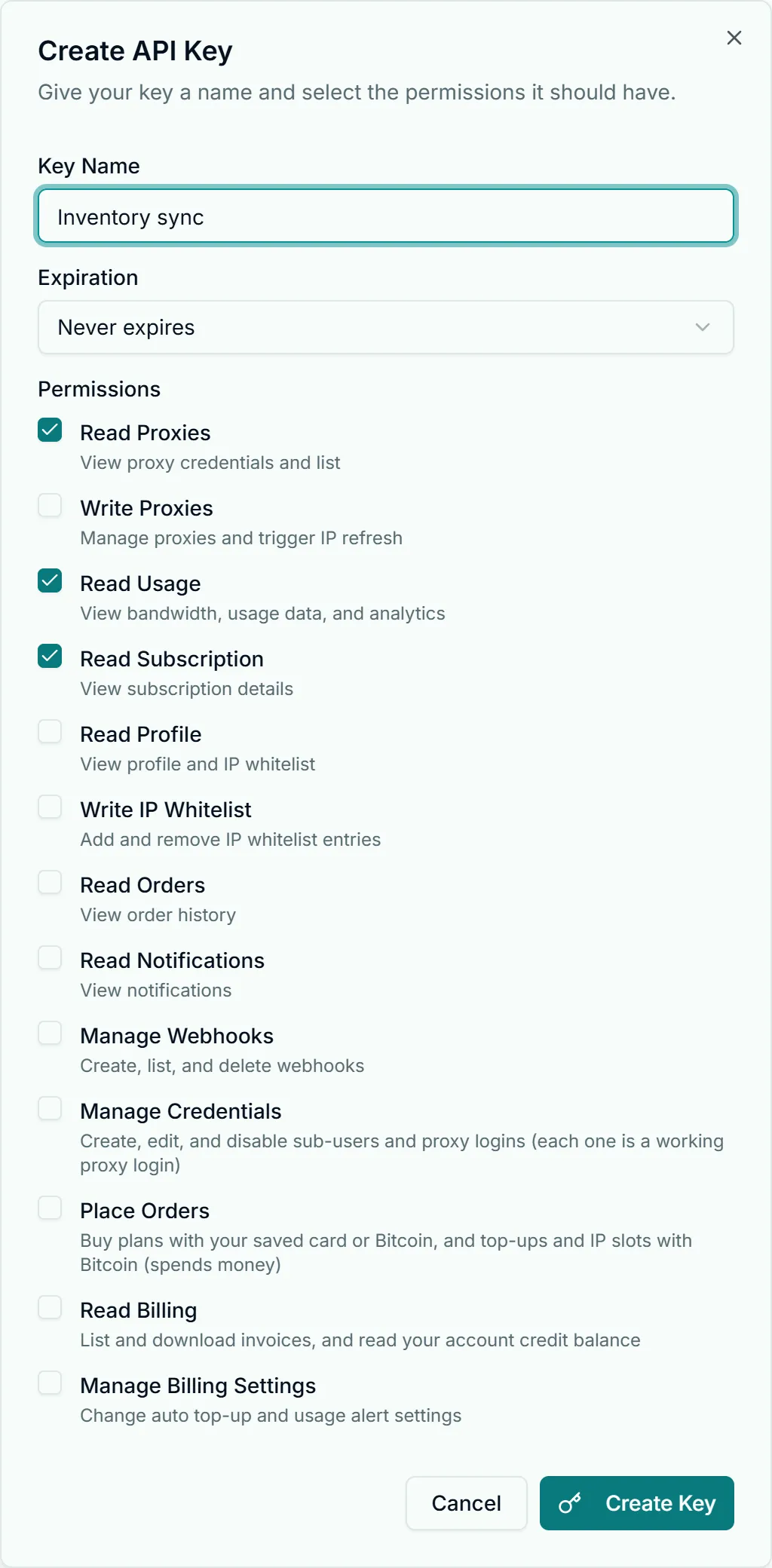
replacementLimitbefore building a job around it. - Two API keys, scoped narrowly. The monitor needs
read:proxiesfor health and the proxy list, pluswrite:proxiesfor the replace call. Webhook registration needswrite:webhooks, which is a one-off job and does not belong on the monitor's key.
Read proxy health
GET /proxies/health returns one row per active proxy, the same health state the dashboard's Proxies page shows in each proxy's row of its endpoint table, where a failing proxy with a replacement queued reads Failing with the replacement attempt beside it. It carries no usernames or passwords:
{
  "success": true,
  "data": {
    "total": 3,
    "healthy": 2,
    "proxies": [
      {
        "proxyId": 1201,
        "host": "203.0.113.18",
        "port": 4443,
        "protocol": "http",
        "proxyType": "premium_datacenter",
        "country": "US",
        "city": null,
        "isHealthy": true,
        "lastHealthCheck": "2026-10-17T09:40:12.000Z",
        "replacementPending": false,
        "retryInfo": null
      },
      {
        "proxyId": 1202,
        "host": "203.0.113.40",
        "port": 4443,
        "protocol": "http",
        "proxyType": "premium_datacenter",
        "country": "US",
        "city": null,
        "isHealthy": false,
        "lastHealthCheck": "2026-10-17T09:40:12.000Z",
        "replacementPending": true,
        "retryInfo": { "retryCount": 1, "maxRetries": 8, "nextRetryAt": "2026-10-17T09:55:00.000Z" }
      }
    ]
  }
}
What the fields tell you:
| Field | Meaning |
|---|---|
isHealthy | Whether the address answered Node4's own reachability check |
lastHealthCheck | When that check last ran; null means it has not run for this address yet |
replacementPending | Node4 has already queued a replacement for this proxy |
retryInfo | When a queued replacement is still being retried: attempts so far and the next try |
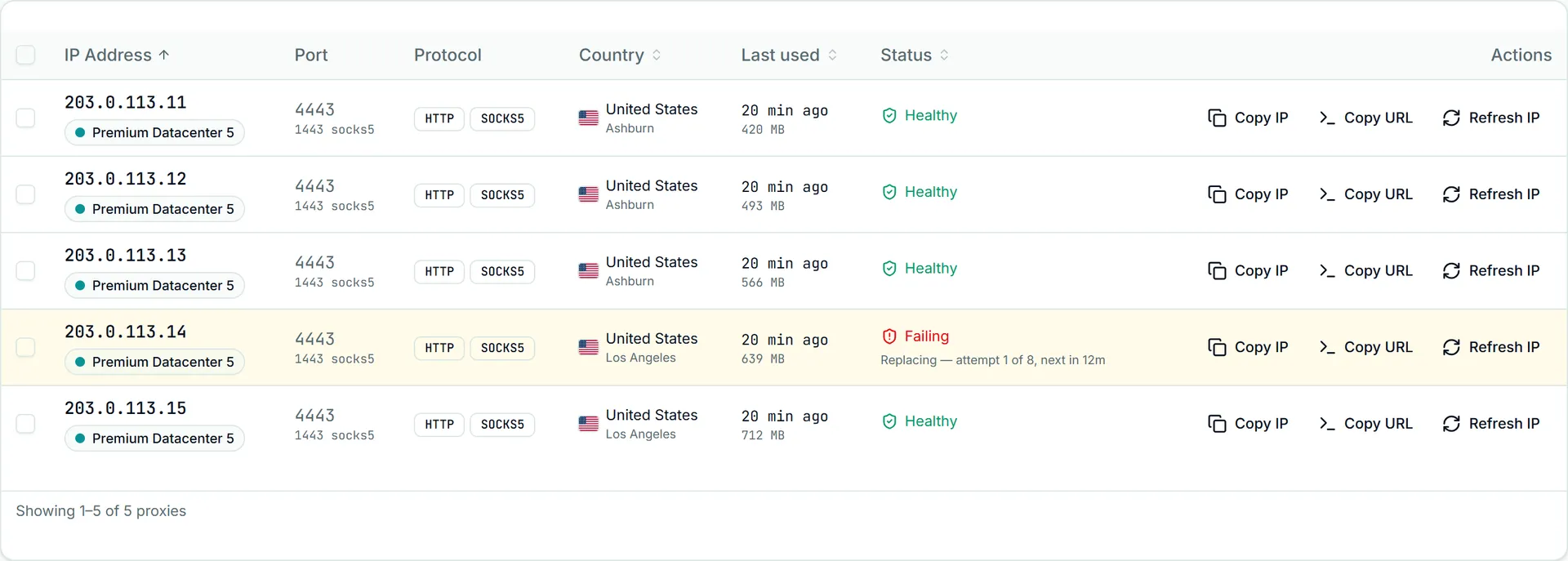
Two limits shape how to use it. The check confirms that the address answers; it cannot see whether a particular site blocks or slows it, so a proxy can be isHealthy: true and still fail on your target. And when replacementPending is true, leave that proxy alone: a replacement is already on its way, and replacing it yourself spends your allowance on work that is already happening.
Decide when to replace
Every replacement uses one from your monthly allowance and gives you a fresh address whose reputation is whatever it already was. Replace on evidence, not on one bad response. A policy that holds up:
- Probe through the proxy against your own targets, plus a neutral endpoint such as
https://api.ipify.org, on a schedule. - Count consecutive failures per proxy, across several runs. A single timeout or a 5xx from the target is usually the target, not the address.
- Replace when the neutral endpoint fails too, or when every one of your targets refuses the address over several runs. If only one target refuses it, the issue is that site's view of datacenter traffic, and why IPs get blocked is the better next step than a new address.
- Skip proxies with
replacementPending: trueand anything replaced in the last hour. - Stop when the allowance is spent and alert a person instead.
A 407 from a proxy is an authentication problem, not a dead address: check the credentials first with fixing 407 errors.
Replace the address
curl -X POST -H "Authorization: Bearer n4k_YOUR_KEY" https://node4.io/api/v1/proxies/1202/replace{
"success": true,
"data": {
"proxyId": 1202,
"oldIp": "203.0.113.40",
"newIp": "198.51.100.112",
"newPort": 4443,
"newUsername": "node4_364512_p4Lx8sQe",
"newPassword": "Rk3vW9nTq2LsYb6m",
"replacementsUsed": 1,
"replacementLimit": 1
}
}The proxy keeps its id and product and moves to the new address with the credentials in the response. Connections open on the old address stop working. The allowance is the same one the dashboard's Refresh IP button and the older POST /proxies/refresh draw on.
Every other answer means something specific:
| Status | Meaning | What to do |
|---|---|---|
403 Your plan does not include IP replacements. | Free plan, Shared Datacenter, or a plan with no allowance (replacementLimit: 0) | Nothing to automate on this plan |
404 | The id is not one of your proxies | Re-read GET /proxies |
409 Proxy is not active. | Expired or suspended | Check the plan, not the address |
409 already in progress | Another replacement of this proxy is running | Wait, then read GET /proxies; it may already have moved |
409 cannot be replaced | This proxy cannot be replaced automatically | Contact support if it is not working |
429 with resetsAt | This month's replacements are used up | Stop; Retry-After and resetsAt say when the allowance resets |
503 | Replacement is temporarily unavailable | Nothing was used; try again later |
Two kinds of 429 exist. The API rate limit answers with retryAfterSeconds in the body and is safe to retry after the wait. The replacement allowance answers with resetsAt and replacementLimit, and its Retry-After can be weeks: do not sleep on it, stop the job.
Never retry a replace blindly
The replace call is not deduplicated. If a request times out or the connection drops, you cannot tell from your side whether the swap landed, and sending it again can use a second replacement and move the proxy twice. Check first:
def replaced_since(proxy_id, old_host):
    r = requests.get(f"{API}/proxies", headers=headers, timeout=30)
    for p in r.json()["data"]["proxies"]:
        if p["id"] == proxy_id:
            return p["host"] != old_host
    return False
If the host has changed, the replacement happened: take the new details from GET /proxies and carry on. Only if it has not changed is a second call a new attempt. The Node.js and Python client libraries from support follow the same rule and never resend a replacement on their own.
Listen for proxy.replaced
The proxy.replaced webhook fires for every replacement: from the API, from the dashboard, by our support team, or automatically after downtime. That makes it the one place to update your own config, whoever triggered the change. Register it once:
curl -X POST https://node4.io/api/v1/webhooks \
  -H "Authorization: Bearer n4k_ADMIN_KEY" \
  -H "Content-Type: application/json" \
  -d '{"name": "proxy-swaps", "url": "https://ops.example.com/hooks/node4", "events": ["proxy.replaced"]}'
The same webhook can be created without code in Account Settings → API & Webhooks with Create Webhook, ticking Proxy Replaced.
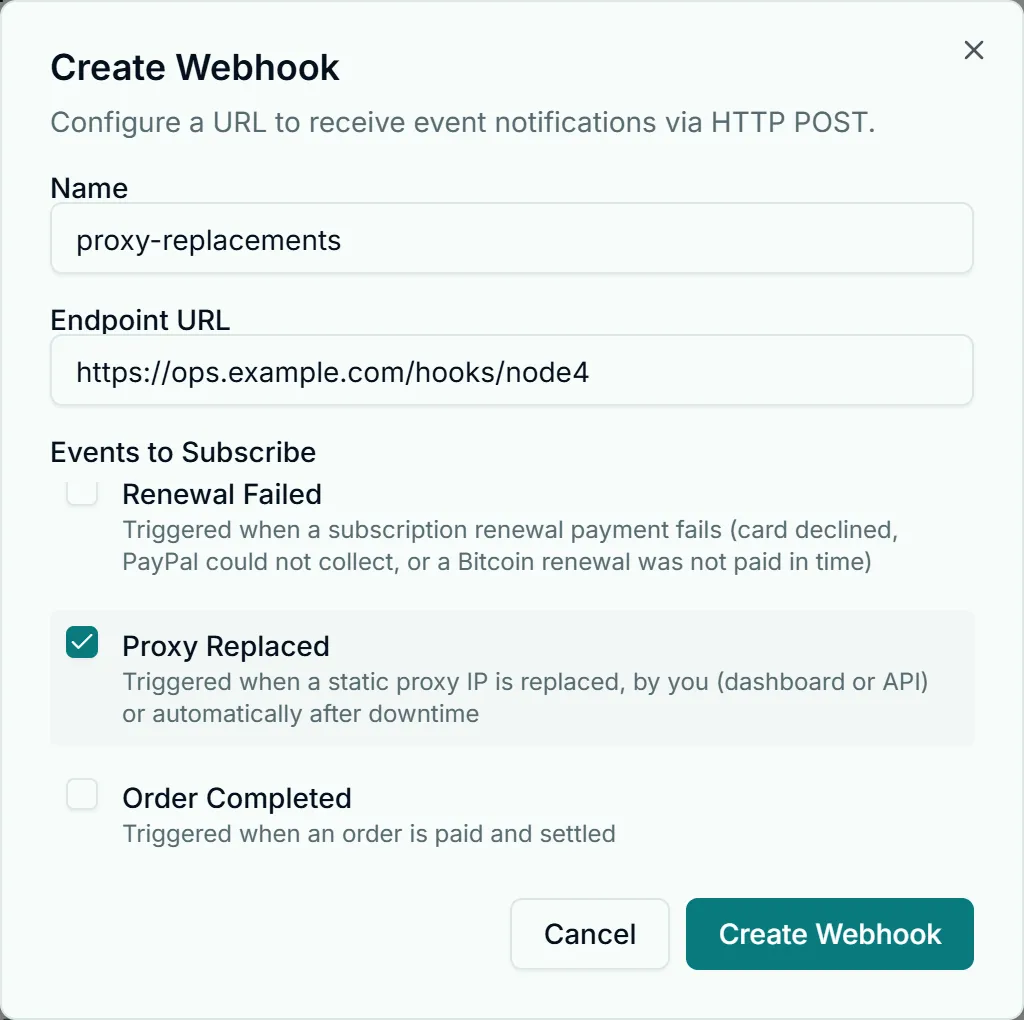
Keep the secret from the response: the API returns it only once, though the dashboard's Copy secret button shows it again. Each delivery looks like this:
{
  "id": "evt_3f9a1c0b7d2e4a6f8b1c2d3e",
  "event": "proxy.replaced",
  "data": {
    "proxyId": 1202,
    "oldIp": "203.0.113.40",
    "newIp": "198.51.100.112",
    "newPort": 4443,
    "reason": "manual",
    "timestamp": "2026-10-17T09:47:31.000Z"
  },
  "timestamp": 1792230451000
}
The outer timestamp is the send time in epoch milliseconds; the one inside data is ISO 8601. reason is manual when you replaced it, support when our team did, and auto when Node4 replaced it after downtime, with downtimeMinutes added. The payload carries no credentials, so fetch them from GET /proxies after you receive it. A small Node.js receiver that verifies the signature and skips repeats:
import express from "express";
import crypto from "node:crypto";

const app = express();
const seen = new Set(); // use a database in production

app.post("/hooks/node4", express.raw({ type: "application/json" }), async (req, res) => {
  const expected = crypto.createHmac("sha256", process.env.NODE4_WEBHOOK_SECRET).update(req.body).digest("hex");
  const given = req.get("X-Node4-Signature") ?? "";
  if (given.length !== expected.length || !crypto.timingSafeEqual(Buffer.from(given), Buffer.from(expected))) {
    return res.status(401).end();
  }
  const evt = JSON.parse(req.body.toString("utf8"));
  if (seen.has(evt.id)) return res.status(200).end();
  seen.add(evt.id);

  if (evt.event === "proxy.replaced") {
    const { proxyId, oldIp, newIp, reason } = evt.data;
    console.log(`proxy ${proxyId}: ${oldIp} -> ${newIp} (${reason})`);
    // re-read GET /proxies and push the new host and credentials to your workers
  }
  res.status(200).end();
});

app.listen(3000);
Answer with a 2xx quickly and do the slow work afterwards; a timeout or 5xx is retried with the same event id. The full delivery rules are in webhooks, and receiving Node4 webhooks covers signature checks and retries in depth.
A small monitoring script
This Python job runs from cron every 10 minutes. It probes each healthy-looking proxy through itself, keeps a failure count on disk, and replaces only after three failed runs in a row, never more than one call per proxy per run. Allowances are small, so it stops and alerts a person as soon as the allowance is used:
import json, os, pathlib, requests

API = "https://node4.io/api/v1"
headers = {"Authorization": f"Bearer {os.environ['NODE4_API_KEY']}"}
STATE = pathlib.Path("proxy-failures.json")
THRESHOLD = 3

failures = json.loads(STATE.read_text()) if STATE.exists() else {}
proxies = {p["id"]: p for p in requests.get(f"{API}/proxies", headers=headers, timeout=30).json()["data"]["proxies"]}
health = requests.get(f"{API}/proxies/health", headers=headers, timeout=30).json()["data"]["proxies"]

def probe(p):
    url = f"http://{p['username']}:{p['password']}@{p['host']}:{p['port']}"
    try:
        r = requests.get("https://api.ipify.org", proxies={"http": url, "https": url}, timeout=15)
        return r.status_code == 200
    except requests.RequestException:
        return False

for h in health:
    pid, key = h["proxyId"], str(h["proxyId"])
    if h["replacementPending"] or pid not in proxies:
        continue
    if probe(proxies[pid]):
        failures.pop(key, None)
        continue
    failures[key] = failures.get(key, 0) + 1
    if failures[key] < THRESHOLD:
        continue
    try:
        r = requests.post(f"{API}/proxies/{pid}/replace", headers=headers, timeout=60)
    except requests.RequestException:
        print(f"{pid}: outcome unknown, check GET /proxies before trying again")
        continue
    if r.ok:
        d = r.json()["data"]
        print(f"{pid}: {d['oldIp']} -> {d['newIp']} ({d['replacementsUsed']}/{d['replacementLimit']})")
        failures.pop(key, None)
        if d["replacementsUsed"] is not None and d["replacementsUsed"] >= d["replacementLimit"]:
            print("allowance used for this month; alerting a person")
            break
    elif r.status_code == 403:
        print("this plan includes no replacements; alerting a person")
        break
    elif r.status_code == 429 and "resetsAt" in r.json():
        print(f"allowance used up until {r.json()['resetsAt']}; alerting a person")
        break
    else:
        print(f"{pid}: {r.status_code} {r.json().get('error')}")

STATE.write_text(json.dumps(failures))
It makes two API reads and at most a few writes per run, far inside the 60-per-minute limit. Add your own targets to probe for a signal that matches your work, and keep the threshold high enough that a target's bad minute does not spend your allowance. When a fleet needs more fresh addresses than the allowance covers, more proxies is usually the cheaper fix than more replacements: plan sizes are on /pricing/dedicated and /pricing/shared.