Receiving Node4 Webhooks
Register a webhook endpoint, verify the X-Node4-Signature HMAC in Node or Python, dedupe on the event id, and handle retries and auto-disable.
A Node4 webhook is an HTTPS POST to a URL you register, carrying a JSON body and an X-Node4-Signature header: the hex HMAC-SHA256 of the raw body, keyed with the webhook's secret. Your endpoint verifies that signature, answers any 2xx quickly, and skips event ids it has already processed. This page walks through each step with working code. The endpoint list and scopes are in the API reference.
Before you start
- An API key with the
write:webhooksscope, created under Account Settings → API & Webhooks (API key security covers scoping and storage). You can also create webhooks in that tab without a key. - A public
https(orhttp) URL that reaches your server. Internal destinations are refused:localhost, private, loopback and link-local addresses, and hostnames that resolve to any of them. For local development, expose your machine through a tunnel that gives you a public hostname. - The final URL. Redirects are never followed, so a URL that answers
301or302counts as a failed delivery.
Register the endpoint
Pick the events you want and POST them with a name and URL:
curl -X POST -H "Authorization: Bearer n4k_YOUR_KEY" -H "Content-Type: application/json" \
  -d '{
    "name": "billing-and-usage",
    "url": "https://ops.example.com/hooks/node4",
    "events": ["usage.threshold_reached", "renewal.failed", "proxy.replaced", "order.completed"]
  }' https://node4.io/api/v1/webhooks
{
"success": true,
"data": {
"id": 57,
"name": "billing-and-usage",
"url": "https://ops.example.com/hooks/node4",
"secret": "9b2f0c4e1a7d3b6c8e5f2a9d0c1b4e7f6a3d8c2b5e9f1a0d4c7b3e6f2a8d5c1b",
"events": ["usage.threshold_reached", "renewal.failed", "proxy.replaced", "order.completed"]
}
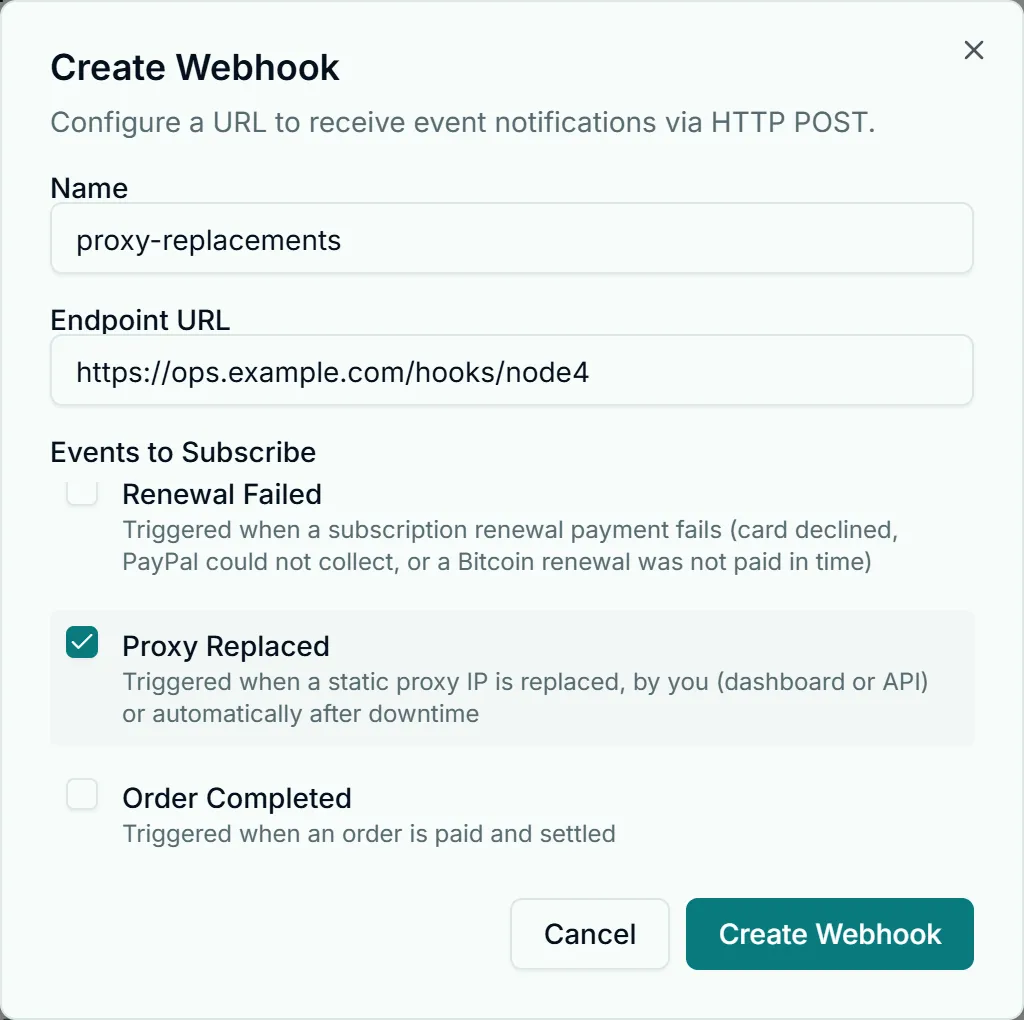
}Store secret in your secrets manager straight away. GET /webhooks lists your webhooks without it; the dashboard's Copy secret button shows it again for a signed-in user. You can also register the endpoint without code: Create Webhook in Account Settings → API & Webhooks asks for the same name, URL and events.
There is no rotate call: to change a secret, create a second webhook to the same URL, switch your verifier to its secret, then DELETE /webhooks/{id} the old one.
The same request from Node.js 18+ and Python:
const res = await fetch("https://node4.io/api/v1/webhooks", {
  method: "POST",
  headers: {
    Authorization: `Bearer ${process.env.NODE4_API_KEY}`,
    "Content-Type": "application/json",
  },
  body: JSON.stringify({
    name: "billing-and-usage",
    url: "https://ops.example.com/hooks/node4",
    events: ["usage.threshold_reached", "renewal.failed"],
  }),
});
const { data } = await res.json();
console.log(data.id, data.secret); // save the secret now
import json, os, urllib.request
req = urllib.request.Request(
"https://node4.io/api/v1/webhooks",
method="POST",
headers={
"Authorization": "Bearer " + os.environ["NODE4_API_KEY"],
"Content-Type": "application/json",
},
data=json.dumps({
"name": "billing-and-usage",
"url": "https://ops.example.com/hooks/node4",
"events": ["usage.threshold_reached", "renewal.failed"],
}).encode(),
)
with urllib.request.urlopen(req) as resp:
data = json.load(resp)["data"]
print(data["id"], data["secret"]) # save the secret nowAn unknown event name returns 400 with the list of valid names, and an account holds at most 10 webhooks.
What a delivery looks like
Every delivery is a POST with Content-Type: application/json and these headers:
| Header | Value |
|---|---|
X-Node4-Event | The event name, such as usage.threshold_reached |
X-Node4-Event-Id | The event id (evt_ plus 24 hex characters), the same as id in the body |
X-Node4-Signature | Hex HMAC-SHA256 of the raw request body, keyed with the webhook secret |
X-Node4-Delivery | An identifier for this one attempt, different on every retry |
The body has four fields:
{
  "id": "evt_3f9a1c0b7d2e4a6f8b1c2d3e",
  "event": "usage.threshold_reached",
  "data": {
    "threshold": 80,
    "percentUsed": 82,
    "usedMb": 41984,
    "limitMb": 51200,
    "planName": "Residential 50 GB",
    "timestamp": "2026-10-17T09:14:03.512Z"
  },
  "timestamp": 1792228443530
}
data holds the event's fields. The top-level timestamp is when this attempt was sent, in milliseconds since the Unix epoch; data.timestamp is when the event happened, as ISO 8601.
Verify the signature
The signature covers the exact bytes Node4 sent. Compute the HMAC over the raw body before any JSON parsing: a parsed and re-serialized object can differ by a single space and fail the check. The secret is used as-is, as a UTF-8 string key; do not hex-decode it. Compare with a constant-time function so the comparison time leaks nothing about the expected value.
Node.js with Express:
import express from "express";
import crypto from "node:crypto";

const SECRET = process.env.NODE4_WEBHOOK_SECRET;
const app = express();

function validSignature(rawBody, header) {
  const expected = crypto.createHmac("sha256", SECRET).update(rawBody).digest("hex");
  const a = Buffer.from(expected, "utf8");
  const b = Buffer.from(String(header || ""), "utf8");
  return a.length === b.length && crypto.timingSafeEqual(a, b);
}

// express.raw keeps the body as a Buffer: do not mount express.json() on this route.
app.post("/hooks/node4", express.raw({ type: "application/json" }), (req, res) => {
  if (!validSignature(req.body, req.get("X-Node4-Signature"))) {
    return res.status(401).send("invalid signature");
  }
  const event = JSON.parse(req.body.toString("utf8"));
  res.status(204).end();         // acknowledge first
  setImmediate(() => handle(event)); // then do the work
});

app.listen(3000);
Python with Flask:
import hashlib, hmac, json, os
from flask import Flask, abort, request

SECRET = os.environ["NODE4_WEBHOOK_SECRET"].encode("utf-8")
app = Flask(__name__)

def valid_signature(raw_body: bytes, header: str) -> bool:
    expected = hmac.new(SECRET, raw_body, hashlib.sha256).hexdigest()
    return hmac.compare_digest(expected, header or "")

@app.post("/hooks/node4")
def node4_hook():
    raw = request.get_data()  # raw bytes, read before any parsing
    if not valid_signature(raw, request.headers.get("X-Node4-Signature", "")):
        abort(401)
    event = json.loads(raw)
    enqueue(event)  # hand off to a worker, then answer
    return "", 204
To check your verifier by hand, sign a body yourself and compare:
printf '%s' '{"id":"evt_test","event":"order.completed","data":{},"timestamp":0}' \
  | openssl dgst -sha256 -hmac "$NODE4_WEBHOOK_SECRET" -hex
The signed body includes the send time, so you can also refuse a body whose timestamp is far in the past, which stops someone replaying a captured delivery. All retries happen within seconds of each other, so a window of a few minutes is generous; allow for clock skew on your side.
Respond fast, then process
Node4 waits up to 10 seconds for an answer. A slow handler that times out is retried, so the same event arrives again while the first copy is still running. Verify, record the event, answer 2xx, and do the real work afterwards (a job queue, a background thread, setImmediate for light tasks).
| Your answer | What Node4 does |
|---|---|
Any 2xx | Delivered. Done. |
5xx, a timeout, or a dropped connection | Retried: up to 3 attempts in all, waiting 1 second and then 2 seconds |
3xx or 4xx | Final. Not retried |
Answer 401 only for a bad signature. For anything else you could not handle on your side, return a 5xx so the delivery is retried. Node4 queues deliveries per endpoint rather than sending a burst all at once, so a backlog (a bulk IP replacement, for example) drains at the speed your endpoint answers. Do not rely on events arriving in the order they happened; sort by data.timestamp when order matters.
Deduplicate on the event id
An event keeps its id through every retry, and the same event sent to two of your webhooks carries the same id on both. Record ids you have processed and skip repeats. Use durable storage with a unique key, so a restart does not forget them. In Python with SQLite:
import sqlite3

db = sqlite3.connect("node4_events.db", isolation_level=None)
db.execute("CREATE TABLE IF NOT EXISTS seen (id TEXT PRIMARY KEY, received_at TEXT)")

def first_time(event_id: str) -> bool:
    cur = db.execute(
        "INSERT OR IGNORE INTO seen (id, received_at) VALUES (?, datetime('now'))",
        (event_id,),
    )
    return cur.rowcount == 1  # 0 means we already had it
The Node equivalent is an INSERT ... ON CONFLICT DO NOTHING into the database you already run. Dedupe on id (or X-Node4-Event-Id), never on X-Node4-Delivery, which changes on every attempt.
One subscription choice also avoids doubles. usage.threshold_reached and bandwidth_threshold.warning / .exceeded fire for the same threshold crossing, as separate events with separate ids. Subscribe to one family, not both.
Auto-disable after repeated failures
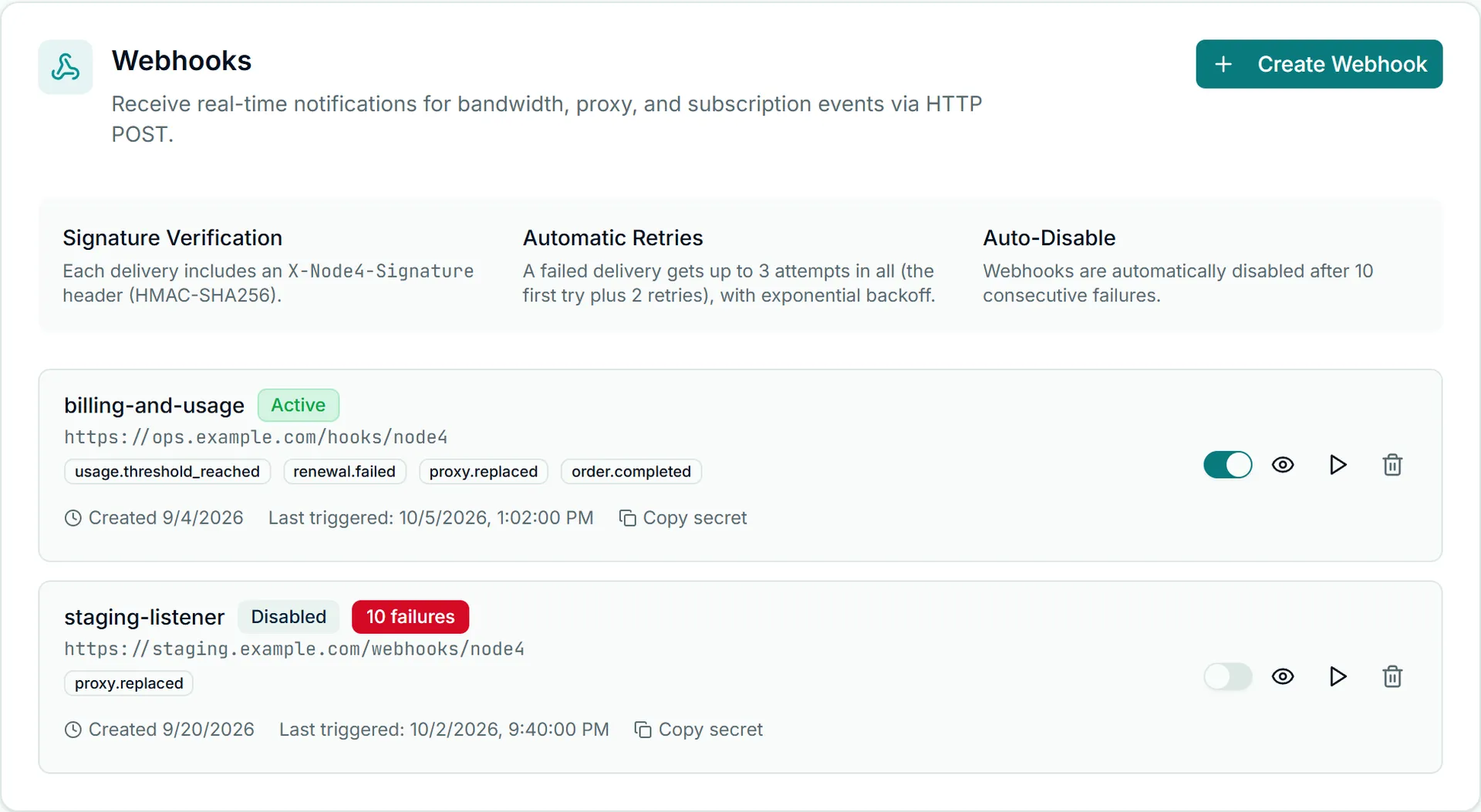
Each event that still fails after its attempts counts as one failure. After 10 consecutive failures the webhook is switched off, and any delivery still waiting for it is dropped. One successful delivery resets the count.
A disabled webhook shows Disabled in Account Settings → API & Webhooks and "isActive": false in GET /webhooks. Events raised while it was off are not stored for later, so after fixing your endpoint:
- Switch the webhook back on in the dashboard. This resets its failure count. (The API can create and delete webhooks but has no call to re-enable one.)
- Press Send Test to confirm your endpoint answers
2xx. - Reconcile what you missed from the API:
GET /ordersfor purchases,GET /usagefor consumption,GET /proxiesfor current addresses.
Events and their payloads
These events are delivered today. The examples show data; each arrives in the envelope shown above.
usage.threshold_reached: usage crossed 80% or 100% of the allowance (plan plus anything purchased). Once per threshold per billing period, at the same moment as the alert email. It follows the webhook switches in your alert settings; automating billing with the API shows how to change them.
{ "threshold": 100, "percentUsed": 100, "usedMb": 51245, "limitMb": 51200,
  "planName": "Residential 50 GB", "timestamp": "2026-10-17T21:40:11.004Z" }
bandwidth_threshold.warning and bandwidth_threshold.exceeded: the older pair for the same 80% and 100% crossings, with the same fields plus userId.
usage.forecast_runout: at your recent pace (the last 7 complete days, or fewer since the period started, never under 2), a metered allowance is estimated to run out within 5 days and before your plan renews. It is an estimate: runOutAt is the central date, earliestAt and latestAt bound it (latestAt is null when the slower end of the range lasts until renewal), and sampleDays says how many days it rests on. Sent at most once per billing period, with the run-out email, and not when auto top-up is on and can still top up this period, when usage is already at 90% or more, or after the 100% alert. It follows the 80% webhook switch.
{ "subscriptionId": 812, "planName": "Residential 50 GB", "usedMb": 38912,
  "limitMb": 51200, "percentUsed": 76, "runOutAt": "2026-10-22T10:39:09.215Z",
  "earliestAt": "2026-10-21T21:31:26.273Z", "latestAt": "2026-10-23T04:24:53.194Z",
  "periodEnd": "2026-10-30T00:00:00.000Z", "paceMbPerDay": 2930, "sampleDays": 7,
"timestamp": "2026-10-18T06:00:12.441Z" }renewal.failed: a renewal payment failed. provider is card (the saved card was declined or unusable), paypal (PayPal could not collect) or btcpay (a Bitcoin renewal was not paid before the period ended). Sent once per failed renewal.
{ "subscriptionId": 812, "planId": 12, "provider": "card",
  "periodEnd": "2026-10-17T00:00:00.000Z", "serviceStatus": "paused",
  "timestamp": "2026-10-17T00:05:42.118Z" }
serviceStatus paused means the plan's proxies have stopped authenticating; paying while the IPs are still held restores the same addresses. active_until_period_end (PayPal, before the period has ended) means they keep working until periodEnd. What happens next is in subscription management.
proxy.replaced: a static proxy moved to a new IP. reason is manual (you, from the dashboard or the API), support (our support team) or auto (automatic replacement after downtime, which adds downtimeMinutes). New credentials are not in the payload; read them from GET /proxies.
{ "proxyId": 1201, "oldIp": "203.0.113.24", "newIp": "198.51.100.73",
  "newPort": 4443, "reason": "auto", "downtimeMinutes": 18,
"timestamp": "2026-10-17T13:02:55.640Z" }order.completed: an order was paid and settled. Only orders that took money; a zero-value order never sends it. invoiceId is usually set, and can be null if the invoice was not linked yet.
{ "orderId": 9301, "type": "subscription", "status": "completed",
  "amountCents": "…", "currency": "usd", "description": "Shared Datacenter 25",
  "planId": 12, "subscriptionId": 812, "invoiceId": 1001,
  "completedAt": "2026-10-17T10:21:07.000Z", "timestamp": "2026-10-17T10:21:09.311Z" }
(The amount is elided here; amountCents is a whole number of US cents in a real delivery.)
connections.limit_reached: a Rotating Unmetered plan turned connections away at its concurrent-connection limit in the last 24 hours. At most once a week.
{ "userId": 364001, "category": "rotating_unmetered", "limit": 250,
  "refused24h": 1840, "minutesAtLimit24h": 37 }
Accepted but not sent yet: payment.succeeded, payment.failed, subscription.created, subscription.renewed, subscription.canceled and proxy.status_change. Registration accepts them and the dashboard labels them "not sent yet", but nothing delivers them. Use order.completed and renewal.failed for payment outcomes.
Test with the dashboard
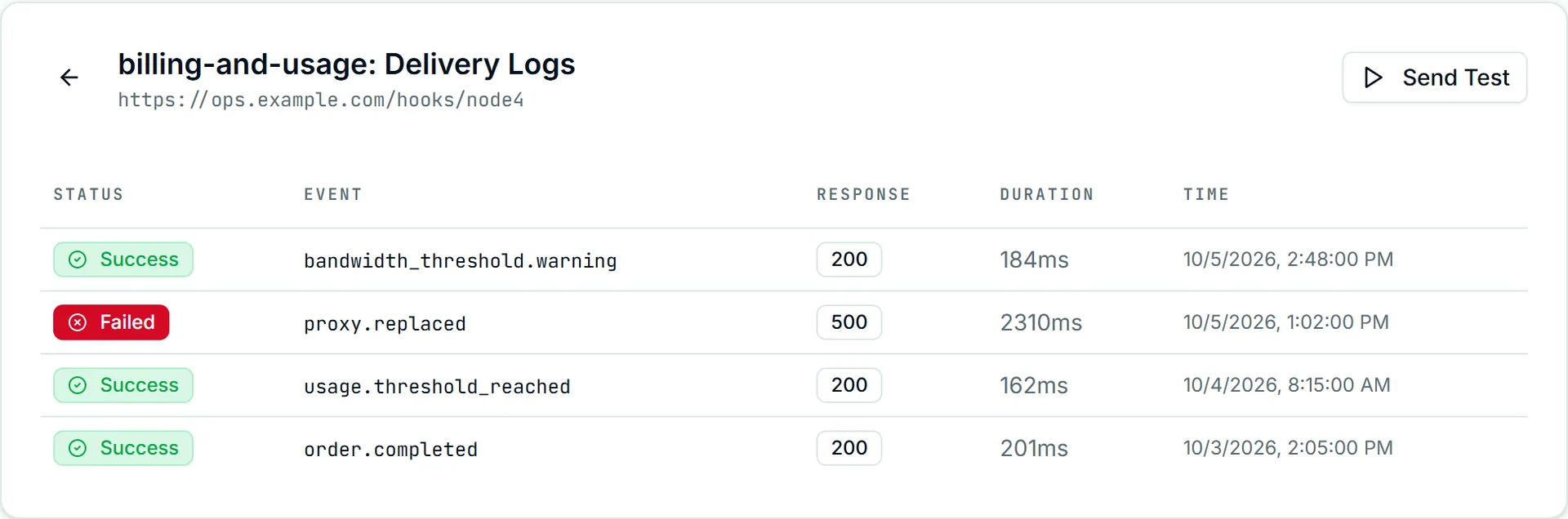
Open Account Settings → API & Webhooks, find the webhook, and press Send Test (the play icon on its row, or the button above its delivery log). Node4 sends one signed POST to that webhook only, whatever events it subscribes to and even while it is disabled:
{
  "id": "evt_8c1d2e3f4a5b6c7d8e9f0a1b",
  "event": "bandwidth_threshold.warning",
  "data": { "test": true, "message": "This is a test webhook delivery from Node4", "timestamp": 1792228443530 },
  "timestamp": 1792228443531
}
The test carries X-Node4-Event: bandwidth_threshold.warning, so have your handler check data.test and skip test deliveries. It makes a single attempt, never counts toward auto-disable, and a non-2xx answer is reported in the dashboard with your endpoint's status code. Each delivery, test or real, appears as one row in the webhook's delivery log with its final status code, response time and any error; a delivery that was retried is still one row, recorded with the number of attempts it took. Open it with the eye icon on the webhook's row.
If the test fails:
- 401 from your endpoint: the signature check failed. Confirm the secret, and that you hash the raw body rather than parsed JSON.
- 3xx: point the webhook at the final URL; redirects are not followed.
- Timed out or connection failed: the URL is not reachable from the internet, or your handler takes longer than 10 seconds.
- Blocked: disallowed destination: the hostname now resolves to a private or internal address.
For the rest of the API, including retries and idempotency on purchases, see the API reference. The product line-up that these events report on is on the features page.