Keeping API Keys Secure
Least-privilege scopes, environment separation, a ten-minute leak response, and rotation that does not take your integration down.
A Node4 API key is a long-lived secret held by machines. Four habits cover most of what can go wrong with one: store it in the environment rather than in a file you commit, grant only the scopes the integration uses, keep one key per environment, and give it an expiry date. This guide covers each, then what to do in the minutes after a key leaks and how to replace a healthy key without an outage. The mechanics of the Bearer header and the scope list are in authentication.
Where to store it
In the environment, injected at deploy time, and never in a file that gets committed.
Git makes a committed key worse than an ordinary file leak: deleting it from the current version leaves the value in every commit that contained it, in every clone and fork, and in the CI caches that checked those commits out. Once a repository has been pushed anywhere shared, treat a key it contained as burned and revoke it.
- Locally: an environment file your version control ignores. Confirm the ignore rule matches before the first commit.
- In CI: the platform's secret store, which injects the value at runtime and masks it in logs.
- In production: a secret manager, so there is one place to change the value and an access log for reads.
Two quieter leaks: debug output that dumps the process environment prints the key into logs that go to a logging vendor, and shell history keeps any key pasted into a curl command. When testing by hand, read the value from the environment rather than typing the literal.
The Node4 client libraries for Node.js and Python (available from support) read NODE4_API_KEY from the environment when no key is passed in code, so the simplest correct setup never names the key in source at all. Their errors carry the status, the response body and headers, never the request's Authorization header, so logging an error object does not log the key.
In Postman, set the collection's apiKey variable to your key as a local value and do not share it. In current Postman, variable values stay local to your instance unless you choose to share them, and turning on the variable's Secure setting keeps the value encrypted on your machine. Before you export or share a collection or environment, or attach one to a support ticket, open it and check that the key is not in it. If you use the Postman VS Code extension, which still has Current and Initial fields, put the key in Current and leave Initial empty.
Grant the smallest scope set
At creation you choose the key's scopes, and a request outside them is refused. Give the integration what it exercises and nothing more:
- A usage dashboard needs
read:usage. - A billing reconciliation job needs
read:billingandread:orders. - A deploy step that pulls the current proxy list needs
read:proxies, notwrite:proxies, unless it triggers refreshes. - A job that issues logins to your own clients needs
write:credentials, and only the one system meant to buy anything should holdwrite:orders.
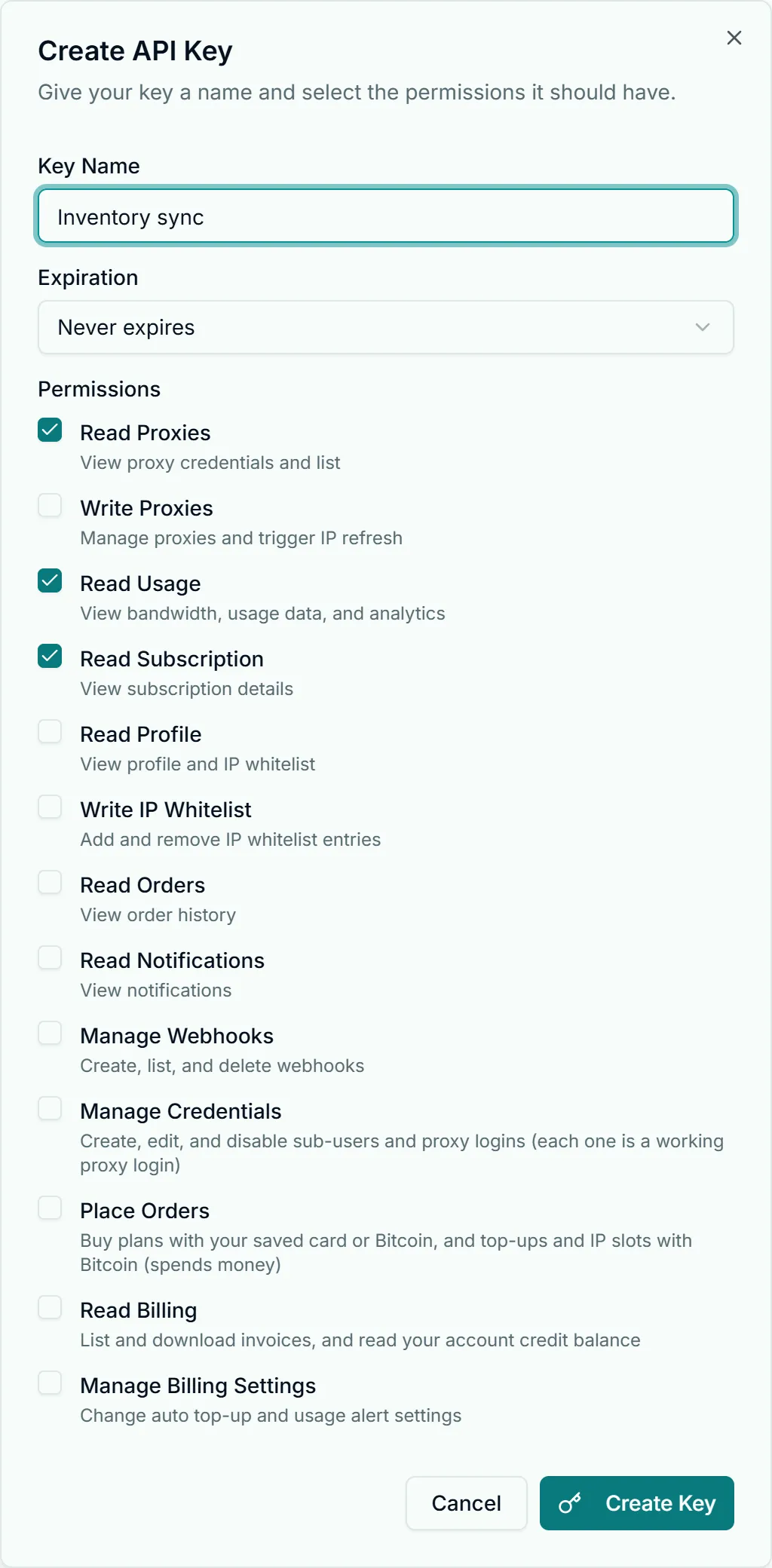
The scopes decide what a stolen key is worth. Read scopes leak information: your proxy inventory, usage patterns, plan and order history, the account email. Write scopes can cost money: write:ip-whitelist lets someone add their own address to your whitelist and push traffic through your proxies with no password; write:proxies can trigger refreshes that replace addresses your consumers are pinned to; write:webhooks can point event delivery at an endpoint they control; write:credentials can mint new working proxy logins; write:orders can buy plans with your saved card. Each is a single HTTP call.
A narrow scope list also shrinks the incident: when a key escapes, its scopes are the complete inventory of what to audit. If an integration later needs another scope, mint a second key rather than widening the first.
One key per environment
Development, staging and production each get their own key, named accordingly. Development keys end up in scratch files, screen shares and bug reports; when development shares a key with production, every one of those spills is a production incident. Separated, you revoke the development key with no customer impact.
Separation also makes revocation decisive. When each key has one known consumer, you know in advance what stops when it dies, and the hesitation that usually delays a response disappears.
Never ship a key to a browser or a mobile app
A key in a browser bundle or a mobile binary is public: the network tab shows every Authorization header, binaries get unpacked, and copies persist in CDN caches and archives after you ship a fix. No scope is safe enough to excuse it. Put the key behind your own backend: the browser calls your server, your server holds the key and calls the API. For sample repositories, tutorials or screencasts, mint a throwaway key first and revoke it afterwards.
If a key leaks
In order:
- Revoke the key under Account Settings → API & Webhooks, before the replacement exists. A broken integration is cheap next to an open door, and revocation takes effect on the key's next use.
- Read the dead key's scope list. It defines the audit.
- If it held
write:ip-whitelist, open Account Settings → Auth & IP Access and delete any entry you do not recognize. A foreign entry means someone was using your proxies without credentials. - If it held
write:webhooks, list your webhook endpoints and remove any you did not register. An added endpoint outlives the key that created it. - If it held
write:proxies, check whether refreshes you did not run have replaced any of your proxies, and update consumers if so. - If it held
write:credentials, list your sub-users and credentials and disable any you did not create; each one is a working proxy login. - If it held
write:orders, check your order history for purchases you did not make, and contact support about any. - Check usage for the exposure window. A bandwidth spike you cannot attribute means the key was used, not just exposed.
- Rotate whatever lived beside it. The file or repository that leaked the key probably also held proxy credentials, database strings or other vendors' tokens. Proxy credential handling is in authentication.
Then mint the replacement with a narrower scope list, since the incident has just shown which scopes the key never needed.
Rotating a healthy key without downtime
Run old and new keys side by side for a short window rather than swapping at once:
- Create the new key with the same scopes. Both are now valid.
- Write the new value into your secret store and redeploy or restart consumers so they pick it up.
- Confirm the cutover from your deploy logs, or with one authenticated call from each consumer.
- Revoke the old key. If something breaks at this moment, you have found a consumer that was reading the key from somewhere other than your secret store.
Retries without duplicate charges
A key used for purchasing is also a key that can spend money twice by accident: a timeout, a blind retry, and two orders. The purchase endpoints (POST /orders and POST /topups) require an Idempotency-Key header. Reuse the same key with the same request body on every retry of that purchase: within 24 hours of the first attempt, a retry returns that attempt's result instead of charging again. A new key starts a separate purchase as far as the server knows. Reusing a key with a different body within those 24 hours is not a new purchase: it is refused with 422 and code idempotency_key_reused, and nothing runs. If the answer is outcome_unknown or payment_unconfirmed, stop retrying and check GET /orders/{id} (or GET /orders) before buying anything; do not send the purchase again with a new key. The client libraries reuse the key across their own retries, and never retry other writes. A rate-limited 429 is refused before anything is processed, so retrying one is always safe; the response headers (RateLimit-Remaining, RateLimit-Reset) say how much budget the key has left, and one key per subsystem keeps a retry storm in one job from exhausting another's. Details are in the proxy management API reference.
Expiry and pruning
Keys can be given an expiry date at creation, and it is worth setting one even generously: an expiring key turns "we should rotate sometime" into a date, and a key that quietly stops working in a test environment shows you the gap in your rotation runbook while it is still free to find.
Revoke keys that no longer have a consumer. An idle key is standing attack surface with no offsetting benefit, and a short key list is one you can audit.
The endpoints these keys unlock are cataloged in the proxy management API reference. If your keys manage whitelist entries, the operational side of those is in IP whitelisting best practices. All of this can be rehearsed end to end on the free tier described on the pricing page.