Proxy Authentication: Credentials, IP Whitelist, API Keys
One proxy credential per account, an IP whitelist as the alternative, and an n4k_ key for the REST API. Which to use where, and what each unlocks.
Node4 has two things to authenticate: traffic through the proxies, and calls to the management REST API. The proxies accept a username and password, or a connection from an address you have whitelisted. The API accepts an API key and nothing else.
| Proxy credential | IP whitelist | API key | |
|---|---|---|---|
| Authenticates | Traffic through the proxies | Traffic through the proxies | Calls to the REST API |
| What you send | Username and password in the proxy URL | Nothing; the proxy checks your source address | Authorization: Bearer n4k_... |
| Where it lives | Account Settings → Auth & IP Access, and beside each endpoint on Proxies | Account Settings → Auth & IP Access | Account Settings → API & Webhooks |
| Fits | Laptops, cloud servers, CI, any machine whose address changes | A fixed server or office line you control | Scripts that list proxies, read usage or manage the account |
Proxy credential: one per account
Your account has one proxy username and password. It works on every product the account holds an active plan for: shared and dedicated datacenter, Rotating Datacenter, Rotating Unmetered and residential. You do not get a separate login per product; the same pair goes to whichever host and port you are connecting to.
curl -x http://USERNAME:PASSWORD@HOST:PORT https://api.ipify.orgYour client encodes the pair into a Proxy-Authorization header. For plain HTTP it rides on the request; for HTTPS it is sent during the CONNECT handshake, before any encrypted traffic flows. Either way it is consumed at our edge, and the target site never sees it.
A free account has 1 credential set. Paid accounts can create up to 5 under Auth & IP Access, which is useful when several machines or teammates share the account: each gets its own pair, and you can revoke one without touching the others. The username can be changed there too. It may contain letters, digits and underscores, but never a hyphen, because on the gateway products a hyphen starts a targeting segment.
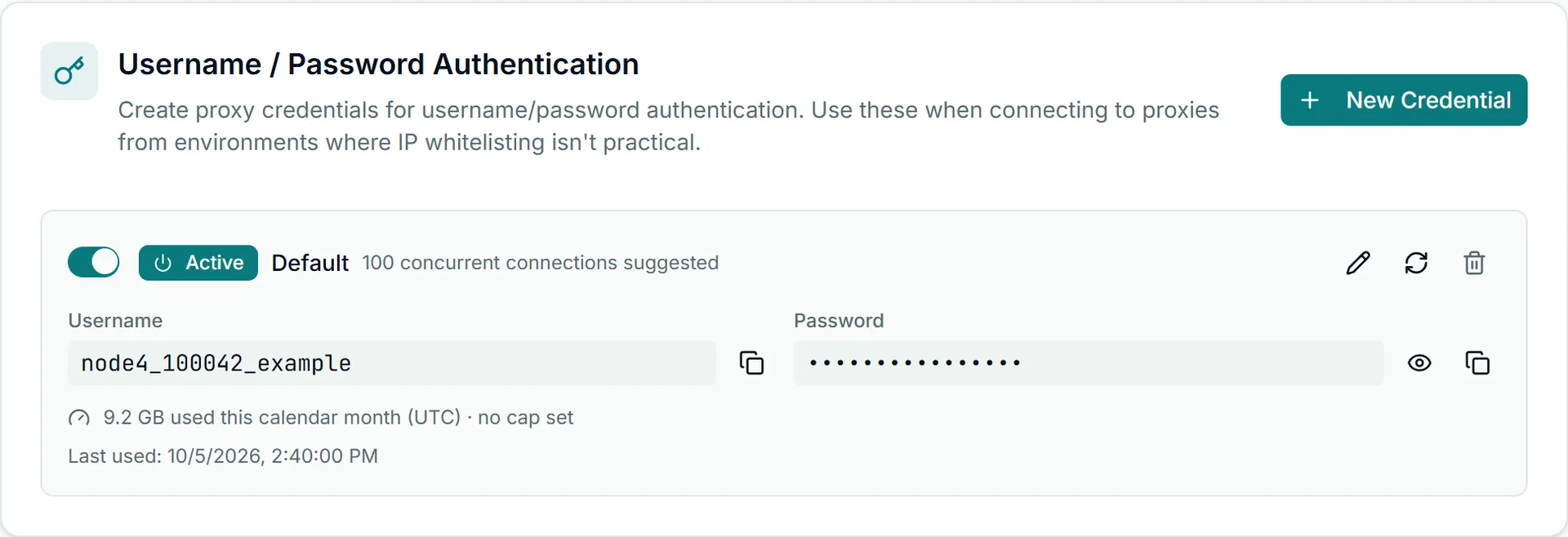
On Rotating Datacenter, Rotating Unmetered and residential, the username also carries instructions: a country, a city or a sticky session is appended as hyphen-separated segments, so USERNAME-country-us and USERNAME-country-de reach different exits with the same password. The grammar is in country and city targeting. A malformed segment stops the whole username matching, which is one of the causes covered in fixing 407 errors.
Treat the credential like a database password: keep it in environment configuration rather than source code, and copy it rather than retype it, since a transcription error produces the same 407 as a wrong password.
IP whitelist: connect with no credential
Under Auth & IP Access, add the public address your machines connect from. Connections arriving from a listed address are accepted with no login attached. Whitelisting works on every product, and what you keep when you use it depends on the product:
- Shared and dedicated datacenter: register the address, connect with no credentials. Nothing is expressed per request, so nothing is lost.
- Rotating Datacenter and Rotating Unmetered: send no credentials for an untargeted exit, or send your username with an empty password to keep country and sticky-session targeting without the secret.
- Residential: send no username and no password at all. A whitelisted residential connection is untargeted and rotates freely across the pool, because targeting rides in the username; any request that pins a country, city or session still authenticates with credentials.
A free account has 1 whitelist slot; paid plans include 3. Entries are single addresses, not ranges, and an address can be whitelisted by one account across the whole platform. The two modes are alternatives, not layers: a connection with valid credentials is carried from anywhere, and a connection with none is carried only from a listed address. When neither holds, the proxy answers 407.
Use credentials by default. Switch a workflow to the whitelist when the traffic leaves from an address you control and expect to keep, and there is a concrete reason credentials are awkward there. Home lines without a static IP, shared CI runners and hotel networks are poor candidates; IP whitelisting best practices covers the environments where it holds up.
API key: the management REST API
The REST API automates what the dashboard does by hand, mounted at https://node4.io/api/v1. It does not accept proxy credentials, and the proxies do not accept API keys.
Create a key under Account Settings → API & Webhooks. Every key begins with n4k_, and the full value is shown once, at creation; copy it into your secret store then. Send it as a bearer token:
curl -H "Authorization: Bearer n4k_YOUR_KEY_HERE" \
  "https://node4.io/api/v1/proxies"
Every key is allowed 60 requests per minute, the same on every plan. Over that you get 429; back off rather than retrying at once. If you are near the ceiling, you are usually polling something that rarely changes, so cache proxy lists and subscription state.
At creation you choose the key's scopes, and a request outside them returns 403 naming the missing one:
read:proxiesandwrite:proxies: list your proxies, gateways, sub-users and live connections, and build gateway proxy strings; refresh or replace a static IP.write:credentials: create, change and disable sub-users and other proxy logins. Each one is a working proxy login, so this is never implied bywrite:proxies.read:usage: bandwidth totals and usage analytics, per account and per sub-user.read:subscriptionandread:orders: plan state, the plan and add-on catalog, auto top-up and alert settings, and order history and status.write:orders: buy plans, bandwidth top-ups and IP slots. It spends money, so grant it only to an integration that should.read:billing: invoices, invoice PDFs and your account credit balance.write:subscription: change auto top-up and usage alert settings.read:profile: account details, plus reading the IP whitelist.write:ip-whitelist: add and remove whitelist entries.read:notifications: account notifications.write:webhooks: manage webhook endpoints for event delivery.
Grant only what the integration uses. The endpoint catalog is in the proxy management API reference; storing, rotating and revoking keys is covered in API key security.
When the secrets get crossed
The three secrets are all opaque strings, and they end up in each other's slots. The symptom usually names the mistake:
- An
n4k_key used as a proxy password returns407from the proxy. The proxy does not consult the API key store. - A proxy credential in a Bearer header returns
401from the API. - The account credential against a gateway you hold no plan for (a free account on the rotating or residential gateway, or a lapsed plan) returns
407, exactly as a wrong password would. - A whitelisted office address, with the script now running on a cloud box returns
407, because the cloud machine's address was never listed.
To try both proxy modes and the API before paying, the free tier provisions 3 free shared proxies with 1 GB/month bandwidth and 10 concurrent threads. The features overview maps which products use static endpoints and which use a gateway hostname.