IP Whitelisting Best Practices
A whitelist entry authorizes an address, not a person. Where credential-free proxy auth holds up, where it breaks, and how to spot address drift early.
Whitelisting lets a machine use your proxies with no password, by registering the public address it connects from. It works well from a fixed address you control alone, and badly from anything dynamic, shared or ephemeral.
| Use the whitelist from | Use credentials from |
|---|---|
| A dedicated server you rent alone | A home line without a static IP |
| An office line with a static allocation, where you trust everyone on it | Hosted CI runners and serverless platforms |
| A cloud NAT gateway with a reserved address, fronting a fleet | Containers and Kubernetes pods that egress per node |
| Software that cannot attach proxy credentials at all | Laptops on hotel, coworking or mobile networks |
The comparison of the two modes and the initial setup are in authentication. This guide is about running whitelist mode in practice.
Which products it applies to
Whitelisting works on every product: shared and dedicated datacenter, Rotating Datacenter, Rotating Unmetered and the residential gateway. You register your own source address, so it does not matter that a rotating or residential exit changes per connection.
What you keep differs by product. On the static datacenter products nothing is expressed per request, so nothing is lost. On the rotating gateways, sending no credentials gives an untargeted exit, and sending your username with an empty password keeps country, city and sticky-session targeting without the secret. On residential you send no username and no password at all, so a whitelisted residential connection is untargeted and rotates across the pool; anything that pins a country, city or session still authenticates with credentials.
An entry authorizes an address, not a person
When you add an entry under Account Settings → Auth & IP Access, you are declaring that any connection arriving from that address may use your proxies. The proxy cannot see who is behind the address.
That grant extends to everyone who shares the address. Whitelist an office line and every colleague on it inherits access. Whitelist a home connection behind carrier-grade NAT and you may be authorizing other subscribers of your ISP who present the same public address. Whitelist the NAT gateway of a cloud VPC and every instance behind it is in. Whatever they push through your proxies is metered against your bandwidth. So the standard for an entry: whitelist only addresses whose sharing set you can list and accept.
Find the address the proxy will see
Your machine's own interface usually carries a private address, and NAT rewrites it on the way out. What the proxy sees is your egress address. Ask the outside world from the exact machine that will carry the traffic:
curl -s https://api.ipify.org- Run it where the traffic runs. Checking from your laptop while the workload lives on a server whitelists the wrong network.
- Machines in one facility can differ. Two servers in the same datacenter may egress through different addresses; each distinct answer needs its own entry.
- The answer can change, which is what the rest of this guide is about.
The what is my IP tool shows the address, reverse DNS and headers from the browser you open it in, which is useful for a workstation but not a substitute for the command above on the machine that carries the traffic.
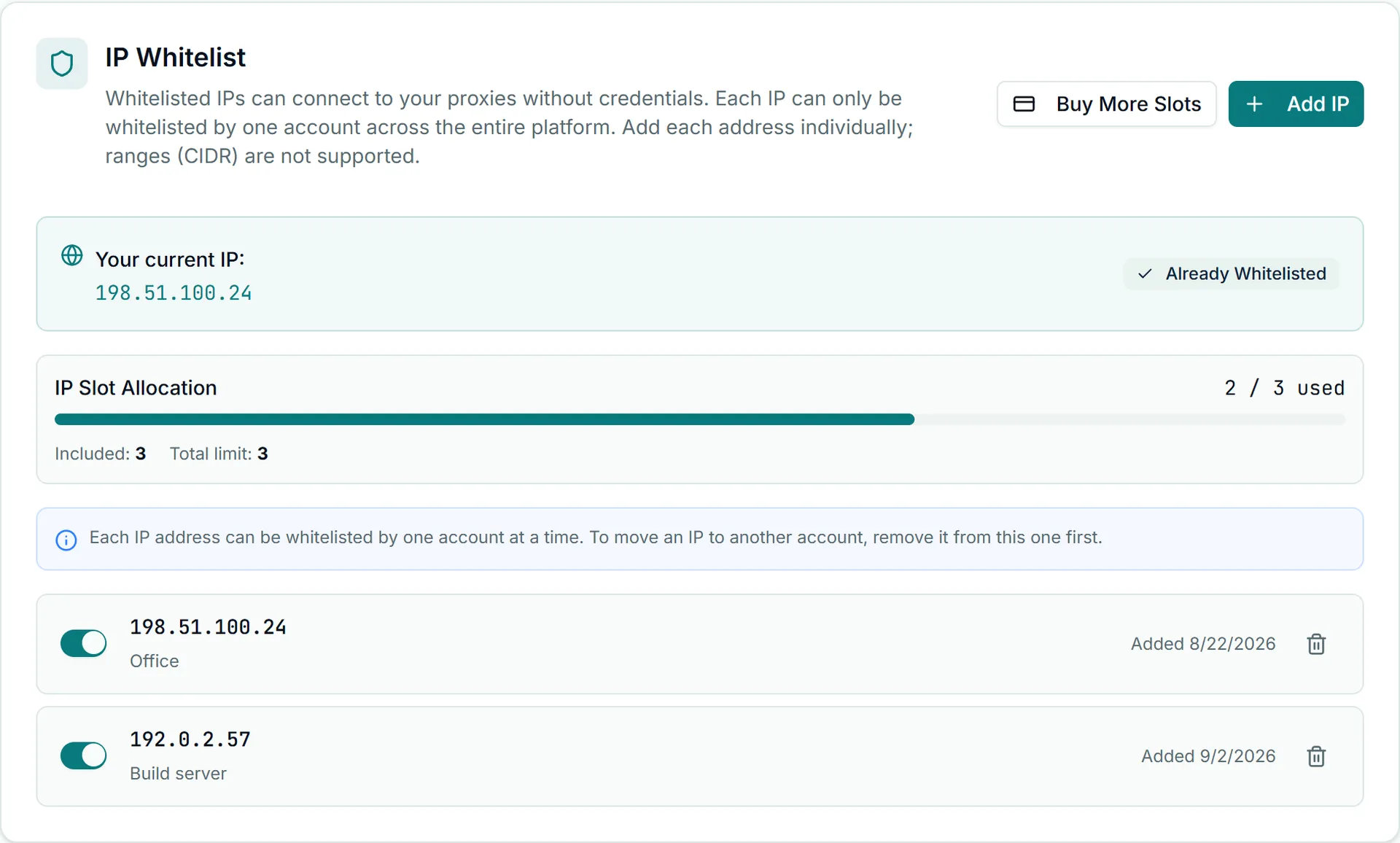
A free account has 1 whitelist slot and paid plans include 3; on a paid plan, Buy More Slots on the same card adds more. Entries are single addresses, not CIDR ranges, and an address can be whitelisted by one account across the platform. Entries can be managed from the dashboard or through the API's /ip-whitelist endpoints, described in the proxy management API reference.
Home lines drift, usually overnight
Consumer ISPs hand out addresses dynamically. A lease renews, a modem reboots, the ISP rebalances a subnet, and your connection comes back on a different public address with nothing changed on your side. The signature: a setup that worked for days fails at the start of a session, often first thing in the morning, with authentication errors and no code changes. Re-adding the new address each time is a treadmill. From a dynamic home connection, credentials are the right tool.
CI runners and serverless have nothing to whitelist
Hosted CI and serverless platforms allocate egress from large shared ranges. Each job can surface from a different address, and every address in the pool is in use by strangers at the same time. Whitelisting the address you observed during one run fails twice: the next run comes from somewhere else, and the entry keeps authorizing whoever occupies that address now.
Two patterns work:
- Credentials in ephemeral compute. Store the proxy username and password in the platform's secret facility. This is the default answer.
- A fixed front door. Route the jobs' outbound traffic through an egress point you control (a cloud NAT gateway with a reserved address, or a self-hosted runner on a static IP) and whitelist that one address. Worth it mainly when many jobs already share one egress.
Containers, Kubernetes and NAT
A container's own address is internal; the proxy sees the egress of the host or gateway the traffic leaves through. On a single Docker host, one entry covers every container on the machine, including ones that have nothing to do with proxies.
Kubernetes pods typically egress with the address of the node they are scheduled on. Different nodes present different addresses, the scheduler moves pods, and autoscaling adds new nodes with new addresses exactly when load rises. The result is authentication that fails apparently at random, with the failure rate climbing under load. The fix is the same as for CI: an egress gateway or cloud NAT with a reserved address so every pod presents one IP, or credentials from inside the cluster.
Reading a 407 in whitelist mode
Whitelist failures and credential failures both produce 407. To tell them apart:
- Establish which mode the failing client is in. If its configuration contains no username, it relies on the whitelist and password theories are off the table.
- Compare fresh egress against the list. Run the discovery command on the failing machine and hold the answer against your entries under Auth & IP Access. A mismatch is drift: correct the entry.
- Cross-test with credentials. Retry from the same machine with a valid username and password. If that succeeds, only the source address was unrecognized. If it also fails, the problem is not the whitelist; see connection issues.
- Use the clock. Drift arrives after reboots, outages, lease renewals or overnight; a wrong credential fails from the first attempt.
The credential-mode causes of 407 (quoting, invisible characters, a lapsed plan) are in fixing 407 errors.
The trade against credentials
Whitelisting removes a stored secret, which is a real gain on fixed infrastructure and for software that cannot send credentials. Everywhere else it couples proxy access to network topology you may not control, spends a finite slot budget, extends access to everyone sharing an address, and fails silently on someone else's schedule. Credentials cost you secret management and work identically from any address.
If you automate whitelist updates (a boot script that discovers its egress and registers it through the API), you have replaced a proxy password with an API key, which is also a secret. Scope that key to whitelist writes only and handle it as described in API key security.
The canonical fit is static products worked from static places: a fleet of datacenter proxies used from a server you control. A free account includes 1 whitelist slot, enough to find out whether your egress address holds still before anything depends on it.