Building Gateway Proxy Strings with the API
Ask the API for ready-made rotating and residential proxy strings by country, state, city or sticky session, in the format your tool imports.
POST /gateways/endpoint returns finished proxy strings for a gateway plan, so your code never assembles the username grammar itself. Send the product and any targeting, and the answer comes back as a http:// URL, a socks5:// URL and a host:port:user:pass line, already checked against your plan and against the exits that exist:
curl -X POST https://node4.io/api/v1/gateways/endpoint \
  -H "Authorization: Bearer n4k_YOUR_KEY" \
  -H "Content-Type: application/json" \
  -d '{"product": "rotating_datacenter", "country": "us"}'
This page walks through that call and the one before it. The field-by-field reference is in gateways and live connections, and the OpenAPI document at /openapi.json has every schema.
Before you start
- An active gateway plan: Rotating Datacenter, Rotating Unmetered or residential. The free tier is static shared datacenter and has no gateway to build strings for.
- An API key with the
read:proxiesscope, created under Account Settings → API & Webhooks. Every call on this page needs only that scope. - At least one active proxy login, listed under Auth & IP Access. A paid account normally has one from its first plan.
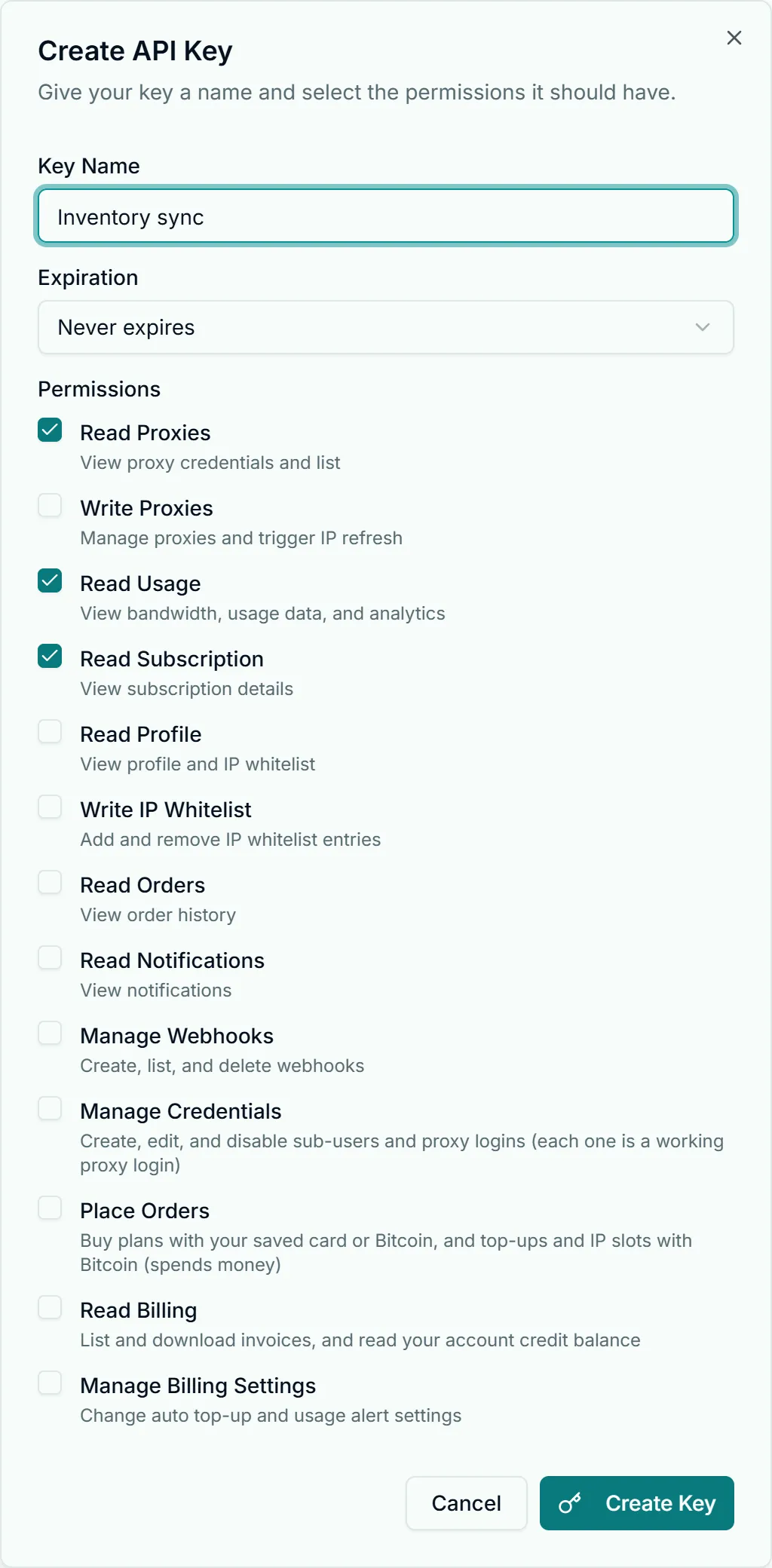
A key holding read:proxies can read proxy passwords, so keep it on your server. API key security covers storage and rotation.
Step 1: see what the account can use
GET /gateways lists one entry per gateway product the account holds, with the hostname, both ports, the logins that authenticate, and the targeting each product accepts:
curl -H "Authorization: Bearer n4k_YOUR_KEY" https://node4.io/api/v1/gateways{
"success": true,
"data": {
"gateways": [
{
"product": "rotating_shared",
"name": "Rotating Datacenter",
"host": "gw-rotating_datacenter.node4.io",
"ports": { "http": 8083, "socks5": 1083 },
"rotation": "per_connection",
"targeting": { "country": true, "state": false, "city": false, "asn": false, "session": true },
"usernameGrammar": "USERNAME[-country-<cc>][-session-<id>]",
"stickySession": { "supported": true, "segment": "-session-<id>", "maxSeconds": 1800, "bestEffort": false },
"usernames": [
{ "username": "node4_364512_k3Jd9xQa", "source": "account", "status": "active", "credentialId": 88, "label": null }
],
"defaultUsername": "node4_364512_k3Jd9xQa"
}
]
}
}(Trimmed to one product.) product is the internal key: Rotating Datacenter is rotating_shared, and requests accept rotating_datacenter as an alias for it. The other keys are rotating_unmetered and residential. A Rotating Unmetered entry also carries connectionLimit, the concurrent-connection ceiling of your plans added together.
Read targeting before you send options. On the residential entry, state, city and asn reflect what your residential plan includes, so the same request can be valid on one account and refused on another.
A login with "status": "over_limit" has used its own monthly bandwidth cap. The gateways refuse it until the cap is raised or the next UTC month starts, so the API never picks it as the default. Sub-user caps are covered in managing sub-users for clients.
Step 2: build the strings
The endpoint takes the same options as a JSON body on POST or as query parameters on GET:
| Option | Accepted on | What it does |
|---|---|---|
product | all (required) | rotating_datacenter (or rotating_shared), rotating_unmetered, residential |
protocol | all | http (default) or socks5; sets port, url and hostPortUserPass |
country | all | Two-letter code, such as us |
state | residential | Two or three characters, such as tx; needs country |
city | residential | Lowercase city code with no separators, such as losangeles; needs country |
asn | residential | The bare network number, such as 7922 |
session | all | Your own sticky session id, letters and digits, 1 to 32 characters |
sticky | all | true mints a session id for you |
count | all | 1 to 100; above 1, each string gets its own new session id |
credentialId or username | all | Which login to build with; default is the first active one |
The GET form is handy in a shell:
curl -H "Authorization: Bearer n4k_YOUR_KEY" \
  "https://node4.io/api/v1/gateways/endpoint?product=residential&country=us&state=tx&city=austin&protocol=socks5"
Every response has the same shape. With count above 1 the endpoints array holds one entry per session, and the first entry's fields are repeated at the top level for the single-string case:
{
  "success": true,
  "data": {
    "product": "residential",
    "name": "Residential",
    "protocol": "http",
    "rotation": "per_connection",
    "targeting": { "country": "us", "state": "ny", "city": null, "asn": null },
    "sticky": { "enabled": true, "maxSeconds": 1800, "note": "..." },
    "host": "gw-residential.node4.io",
    "port": 8082,
    "username": "node4_364512_k3Jd9xQa-country-us-state-ny-session-q7m2x9ka4p",
    "password": "Vt8yKp2LwQ9sRb4n",
    "url": "http://node4_364512_k3Jd9xQa-country-us-state-ny-session-q7m2x9ka4p:Vt8yKp2LwQ9sRb4n@gw-residential.node4.io:8082",
    "http": "http://...@gw-residential.node4.io:8082",
    "socks5": "socks5://...@gw-residential.node4.io:1082",
    "hostPortUserPass": "gw-residential.node4.io:8082:node4_364512_k3Jd9xQa-country-us-state-ny-session-q7m2x9ka4p:Vt8yKp2LwQ9sRb4n",
    "endpoints": [
      { "sessionId": "q7m2x9ka4p", "host": "gw-residential.node4.io", "port": 8082, "username": "...", "password": "...", "url": "...", "http": "...", "socks5": "...", "hostPortUserPass": "..." }
    ]
  }
}
Pick the output format
All three forms carry the same login, so choose by what reads them:
| Field | Shape | Feed it to |
|---|---|---|
http | http://user:pass@host:port | curl -x, Python requests, most HTTP libraries |
socks5 | socks5://user:pass@host:port | SOCKS5 clients and libraries; see SOCKS5 setup |
hostPortUserPass | host:port:user:pass | Proxy testers, scraping tools and browser extensions that import a list |
url is whichever of http or socks5 matches the protocol you asked for. The URL forms are percent-encoded, so they are safe to paste even if a password contains a reserved character; the bare username and password fields are not encoded.
Use them from code
A Node.js 18+ job that asks for 20 sticky residential sessions in the United States and spreads its work across them, using undici for proxy support:
import { ProxyAgent, fetch } from "undici";

const res = await fetch("https://node4.io/api/v1/gateways/endpoint", {
  method: "POST",
  headers: {
    Authorization: `Bearer ${process.env.NODE4_API_KEY}`,
    "Content-Type": "application/json",
  },
  body: JSON.stringify({ product: "residential", country: "us", count: 20 }),
});
if (!res.ok) throw new Error(`${res.status}: ${(await res.json()).error}`);
const { endpoints } = (await res.json()).data;

// Each session keeps its own exit; one worker per session.
const agents = endpoints.map((e) => new ProxyAgent(e.http));
const r = await fetch("https://api.ipify.org?format=json", { dispatcher: agents[0] });
console.log(await r.json()); // { ip: "..." }
The same in Python with requests, for one rotating string with no session:
import os
import requests

API = "https://node4.io/api/v1"
headers = {"Authorization": f"Bearer {os.environ['NODE4_API_KEY']}"}

r = requests.post(f"{API}/gateways/endpoint", headers=headers,
                  json={"product": "rotating_datacenter", "country": "us"}, timeout=30)
r.raise_for_status()
proxy = r.json()["data"]["http"]

ip = requests.get("https://api.ipify.org", proxies={"http": proxy, "https": proxy}, timeout=30).text
print(ip)
Build strings once and reuse them. They stay valid for as long as the login does, so calling the endpoint before every request spends your 60-per-minute API budget for nothing.
Sticky or rotating
Without session, sticky or count, the string has no session segment and rotates: the gateway picks an exit for each connection, meaning each HTTPS tunnel or SOCKS5 connection, and each plain-HTTP request. Requests sent down one kept-alive tunnel share its exit, so a client that reuses connections rotates less often than one that opens a new one per request. The IP rotation guide shows how to control that from your client.
With a session, every connection carrying that session id leaves from one exit:
- Rotating Datacenter and Rotating Unmetered hold the exit for up to 30 minutes from first assignment. Activity does not extend it; use a new session id to continue.
- Residential holds it best effort, up to 30 minutes. If requests on a session start failing, switch to a new session id.
The Sticky session switch on the Proxies page's Connect card builds the same kind of string by hand, which is a quick way to check what the API returns.
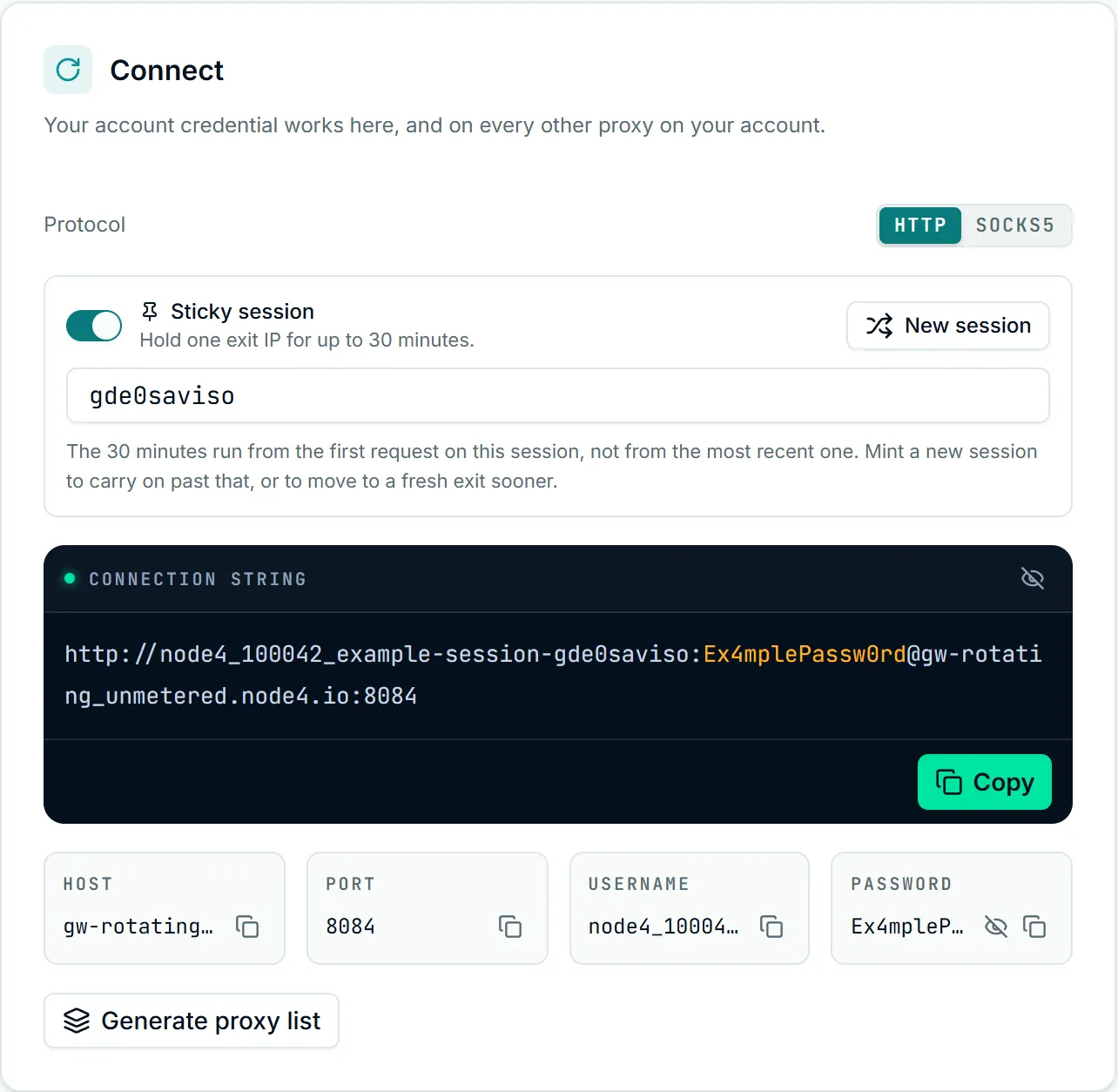
The lifetime is fixed. There is no ttl you can set: sending ttl with any value other than the ceiling (reported as maxSeconds) is refused with a 400 that says so. Which tasks need a session at all is covered in sticky versus rotating sessions.
count is the quickest way to get a pool of independent sticky exits for parallel workers: each of the up to 100 strings has a different session id. It cannot be combined with your own session, and sticky: false with count above 1 is a contradiction the API refuses.
Targeting rules
The rotating products accept country and nothing finer. State, city and ASN are residential, and sending them for a rotating product is a 400 naming the option, rather than a string that would quietly serve any city. Rotating exits are in the United States, Italy and Spain.
On residential, state and city each need country, and the API checks your request against the same coverage list the dashboard's targeting builder uses. Residential targeting explains the segments themselves; the API adds two checks worth knowing:
- A city that exists in more than one state needs
state. When a city code matches cities in two or more states, sending it withoutstatereturns a422that lists those states and shows the corrected username form. Add the state and send it again. - A location with no exits is refused. A country with no coverage returns a
422listing the countries served; an unknown city or state names the/geoendpoint that lists valid codes, such asGET /geo/countries/us/cities.
Errors and how to fix them
| Status | Usual cause | Fix |
|---|---|---|
400 | Unknown product, a malformed code, state/city/asn on a rotating product, count outside 1 to 100, count with session, a ttl | Read the error string; it names the option and the accepted values |
403 | The key lacks read:proxies, or your residential plan does not include that targeting | Add the scope to a new key, or drop the option the plan lacks |
404 | No active plan for that product, or the credentialId/username is not an active login on the account | Check GET /gateways for the products and logins you hold |
409 | The account has no active login, or the login you named is over its monthly cap | Create a login, raise the cap, or pick another login |
422 | No exits in that country, an unknown or ambiguous city, a state with no coverage | Use a location from the list in the error; add state to an ambiguous city |
429 | The API rate limit | Wait for Retry-After |
A string that the API built and the gateway still refuses is a connection problem rather than an API one: fixing 407 errors and connection issues take over there. Static proxies have no gateway string to rebuild; when one of those stops answering, automating IP replacement covers the health check and the replace call.
Rotating Unmetered: size the plan from connection data
Rotating Unmetered is priced by concurrent connections, so the useful number is how many your tools open at once. Two endpoints, on the same read:proxies scope, return the figures the dashboard's live connections panel draws.
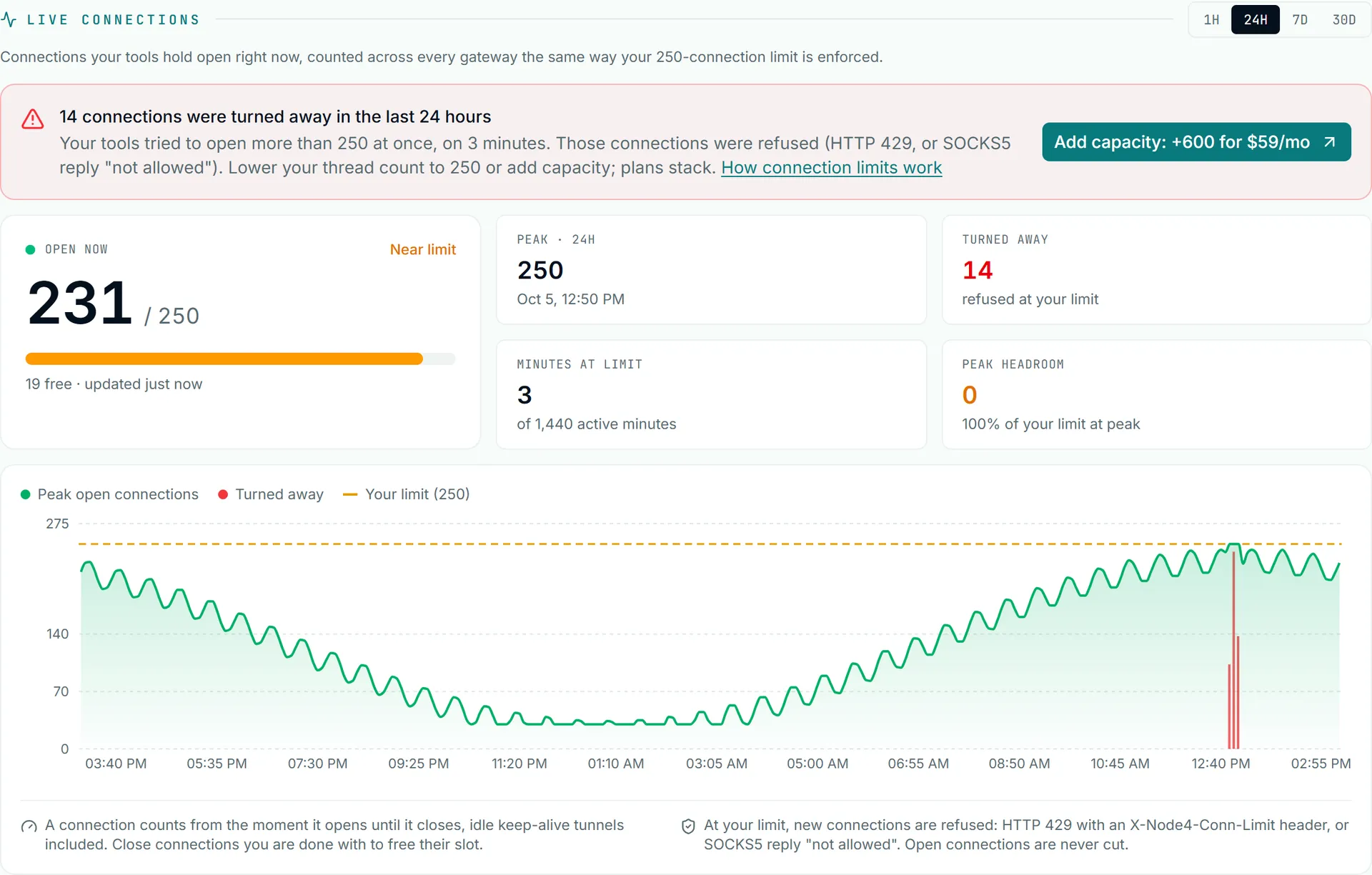
GET /connections/live is a snapshot:
curl -H "Authorization: Bearer n4k_YOUR_KEY" https://node4.io/api/v1/connections/live{
"success": true,
"data": {
"hasPlan": true,
"limit": 250,
"open": 231,
"at": 1792224000000,
"category": "rotating_unmetered",
"refusedThisMinute": 0,
"refusedLast5Minutes": 14
}
}limit is your ceiling across every Rotating Unmetered plan on the account, open is what is open across the whole gateway fleet right now, and the two refused figures count connections turned away at the ceiling. open or the refusal counts can be null when the counter is briefly unreadable; treat that as "unknown", not zero.
GET /connections/history?range=24h returns the series, with 1h, 7d and 30d as the other ranges and 35 days of history kept:
import os, requests

r = requests.get("https://node4.io/api/v1/connections/history", params={"range": "7d"},
                 headers={"Authorization": f"Bearer {os.environ['NODE4_API_KEY']}"}, timeout=30)
d = r.json()["data"]
s = d["summary"]
print(f"limit {d['limit']}, peak {s['peak']}, refused {s['refused']} over {s['minutesAtLimit']} minutes")
if d["suggestion"]:
    print("suggested add-on:", d["suggestion"]["name"])
summary holds the peak, total refusals, minutesAtLimit (minutes that refused at least one connection) and activeMinutes. buckets is the chart data, one { t, peak, refused } per bucket of bucketMinutes. When the range had refusals, suggestion names the smallest plan that, added to what you hold, clears the demand: plans of one type stack, so nothing has to be canceled. redisOk: false means the most recent minutes could not be read and the series may be short at the end.
Read it this way: a peak well under limit with no refusals means the plan has room. Refusals during a few minutes a week usually mean a burst, which a smaller connection pool in your tool may absorb. Refusals across many minutes mean the work needs more concurrency. For an alert instead of a poll, subscribe to the connections.limit_reached webhook described in the API reference. Current plan sizes and prices are on /pricing/unmetered.