Managing Sub-Users for Your Clients with the API
Give each client its own proxy login with a monthly bandwidth cap, track its usage, raise the cap, and switch it off, all from your own code.
If you resell proxy access or run proxies for several clients, give each client its own sub-user: a separate proxy login with its own label, status and monthly bandwidth cap. One API call creates it:
curl -X POST https://node4.io/api/v1/sub-users \
  -H "Authorization: Bearer n4k_YOUR_KEY" \
  -H "Content-Type: application/json" \
  -d '{"label": "acme-corp", "bandwidthLimitMb": 51200}'
That client now has a username and password that work on every product your account holds, and stop working once they move 50 GB in a UTC calendar month. This page walks through the full client lifecycle. The endpoint reference is in sub-users.
Before you start
- A paid plan, for more than one client. A sub-user is one of the account's credential sets, the same ones listed under Auth & IP Access, so the plan's credential limit is the sub-user limit: 5 on a paid account, 1 on the free tier. Your own login is one of them.
- An API key with the scopes the job needs. Listing sub-users needs
read:proxies, creating and changing them needswrite:credentials, and per-sub-user usage needsread:usage. A dashboard that only reports usage can run on a key withoutwrite:credentials.
Create a login per client
Send a label you will recognize in your own billing, and a cap in megabytes:
| Field | Accepted values |
|---|---|
label | Up to 128 characters, or null |
bandwidthLimitMb | A whole number, at least 1024 (1 GB), or null for no cap |
maxConnections | Stored and returned, but advisory: nothing enforces it |
The username and password are generated for you and returned in the 201 response:
{
  "success": true,
  "data": {
    "id": 412,
    "username": "node4_364512_Qm7rT2xa",
    "password": "c9HwLp4ZsY2kVn8e",
    "label": "acme-corp",
    "status": "active",
    "limits": {
      "bandwidthLimitMb": 51200,
      "bandwidthPeriod": "calendar_month_utc",
      "maxConnections": 100,
      "maxConnectionsEnforced": false
    },
    "usage": {
      "periodStart": "2026-10-01T00:00:00.000Z",
      "periodEnd": "2026-11-01T00:00:00.000Z",
      "bandwidthUsedMb": 0,
      "bandwidthRemainingMb": 51200
    },
    "lastUsedAt": null,
    "expiresAt": null,
    "createdAt": "2026-10-17T09:12:44.000Z"
  }
}
Store the id: every later call addresses the sub-user by it. In Node.js 18+:
const API = "https://node4.io/api/v1";
const headers = {
  Authorization: `Bearer ${process.env.NODE4_API_KEY}`,
  "Content-Type": "application/json",
};

export async function createClientLogin(clientName, capGb) {
  const res = await fetch(`${API}/sub-users`, {
    method: "POST",
    headers,
    body: JSON.stringify({ label: clientName, bandwidthLimitMb: capGb * 1024 }),
  });
  const body = await res.json();
  if (!res.ok) throw new Error(`${res.status}: ${body.error}`);
  return body.data; // { id, username, password, ... }
}
To hand the client a connection string for a gateway product, pass the new id as credentialId to POST /gateways/endpoint, which returns the strings with targeting and sticky sessions already applied. Building proxy strings with the gateway API covers that call. For static datacenter proxies, the client uses its username and password with the hosts and ports from GET /proxies. If you replace one of those addresses later, the client needs the new host: automating IP replacement shows how to catch that from the proxy.replaced webhook.
List clients and their usage
GET /sub-users returns every sub-user with this month's usage, plus the plan's limits:
import os, requests

API = "https://node4.io/api/v1"
headers = {"Authorization": f"Bearer {os.environ['NODE4_API_KEY']}"}

d = requests.get(f"{API}/sub-users", headers=headers, timeout=30).json()["data"]
print(f"{d['plan']['used']} of {d['plan']['maxSubUsers']} sub-users, {d['plan']['active']} active")
for s in d["subUsers"]:
    cap = s["limits"]["bandwidthLimitMb"]
    used = s["usage"]["bandwidthUsedMb"]
    print(f"{s['label'] or s['username']:<20} {s['status']:<10} {used:>8.0f} MB / {cap or 'no cap'}")
The same logins appear in the dashboard under Account Settings → Auth & IP Access, in the Username / Password Authentication card, each with its label, monthly cap, usage and an Active or Disabled switch. Changes made in either place show up in the other.
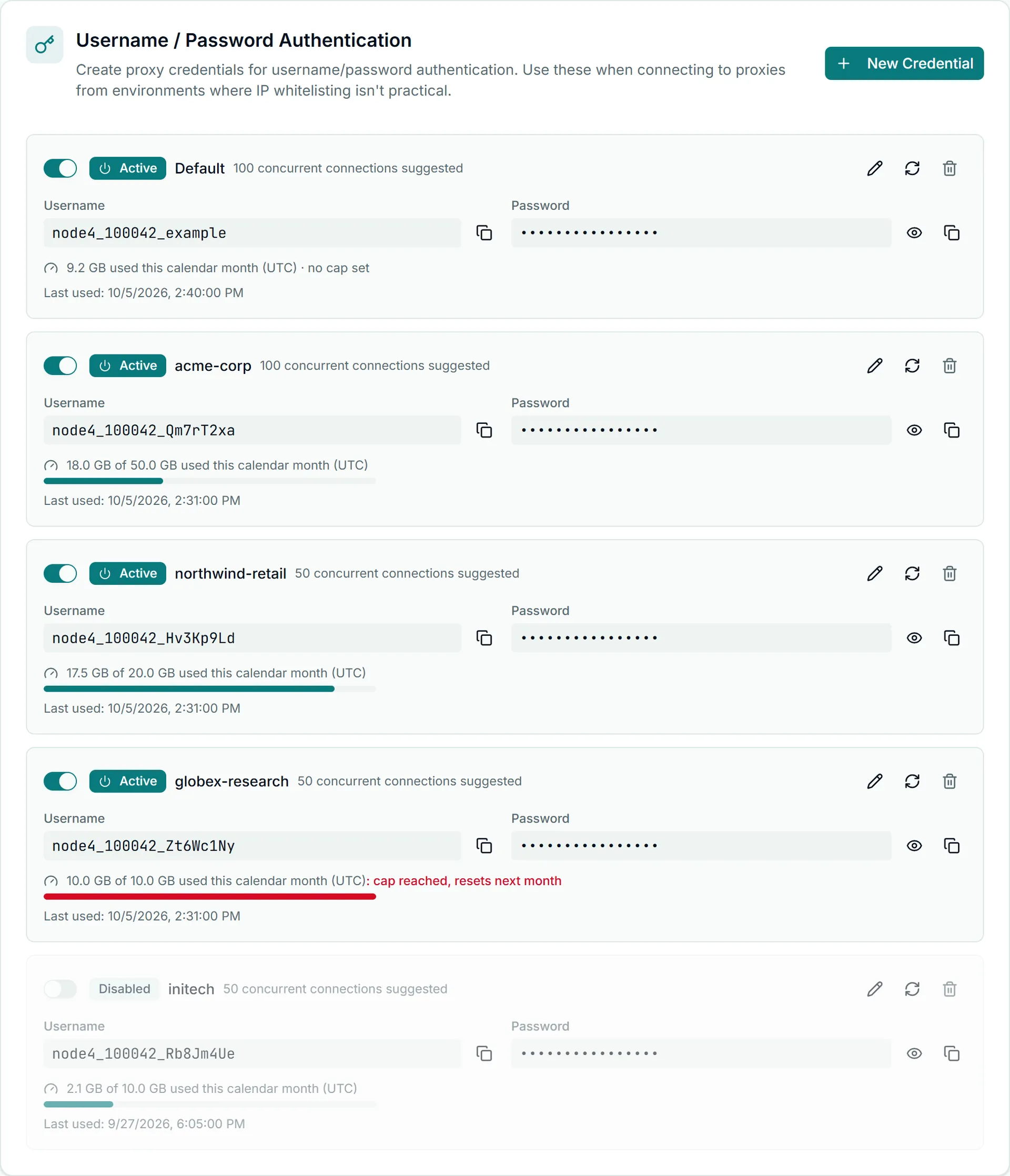
status is one of four values:
| Status | Meaning |
|---|---|
active | Authenticates normally |
over_limit | Has used this month's cap; refused until the cap is raised or the month ends |
disabled | Switched off by you |
expired | Past its expiresAt |
GET /sub-users/{id}/usage (scope read:usage) returns one sub-user's figure for invoicing:
curl -H "Authorization: Bearer n4k_YOUR_KEY" https://node4.io/api/v1/sub-users/412/usage{
"success": true,
"data": {
"id": 412,
"username": "node4_364512_Qm7rT2xa",
"resolution": "calendar_month_utc",
"seriesAvailable": false,
"series": null,
"period": {
"start": "2026-10-01T00:00:00.000Z",
"end": "2026-11-01T00:00:00.000Z",
"bandwidthUsedMb": 18432,
"bandwidthLimitMb": 51200,
"bandwidthRemainingMb": 32768
},
"lastUsedAt": "2026-10-17T08:58:02.000Z"
}
}Per-sub-user usage is a running total for the current UTC month, the same counter the cap is enforced against. There is no hourly or daily series per sub-user (seriesAvailable is false); the account-wide series is GET /usage/bandwidth. To bill a client for a month, read its figure shortly before the month ends, because the counter starts again from zero on the 1st. lastUsedAt can trail real use by a few minutes.
Raise a cap, or switch a client off
PATCH /sub-users/{id} changes label, bandwidthLimitMb, maxConnections or status. Raising a cap brings an over_limit client back within about 2 minutes:
curl -X PATCH https://node4.io/api/v1/sub-users/412 \
  -H "Authorization: Bearer n4k_YOUR_KEY" \
  -H "Content-Type: application/json" \
  -d '{"bandwidthLimitMb": 102400}'
To pause a client that has not paid you, set {"status": "disabled"}, or call DELETE /sub-users/412, which also disables by default. A disabled sub-user keeps its username, its label and this month's counter, so you can turn it back on with {"status": "active"} and the client's configuration still works. Re-enabling counts against the plan's active limit, so a full account has to disable another login first.
requests.patch(f"{API}/sub-users/412", headers=headers, json={"status": "disabled"}, timeout=30)Delete a client for good
DELETE /sub-users/{id}?permanent=true removes the login and frees its slot:
curl -X DELETE -H "Authorization: Bearer n4k_YOUR_KEY" \
  "https://node4.io/api/v1/sub-users/412?permanent=true"
{ "success": true, "data": { "id": 412, "deleted": true } }Use it when the client has left. A disabled sub-user still counts toward the plan's total, so permanent deletion is what makes room for a new client once you reach the limit.
When changes take effect
A cap change, a disable or a delete reaches live traffic within about 2 minutes, because the gateways and proxy nodes cache authentication answers briefly. Plan for that window: disabling a client is not an instant cut-off, and connections already open when you disable it carry on until they close.
A cap is also not exact to the byte. Usage reaches the counter in short batches, so a client running at full speed can go a little past its cap before it is refused. Set the cap slightly below what you sell if the overrun matters to you.
What sub-users do not do
Some limits a reseller might expect cannot be enforced per sub-user, so the API refuses them with a 400 that explains why instead of storing a setting nothing would apply:
- No per-sub-user IP allow-list (
allowedIps,ipWhitelist). The account IP whitelist, managed through/ip-whitelist, is shared by every login. On the rotating gateways a client can send its sub-user username with an empty password from a whitelisted address, and that sub-user's cap and status still apply. On residential a whitelisted connection sends no username at all, so it is untargeted and cannot be tied to a client's sub-user. IP whitelisting best practices covers the account list. - No per-sub-user connection ceiling (
maxConcurrentConnections,connectionLimit). The Rotating Unmetered ceiling is per account and shared by every login on it.maxConnectionsis accepted but advisory. - No per-sub-user product restriction (
allowedProducts,products). A sub-user can use every product the account holds. - No sub-user API keys. API keys belong to your account; your clients get proxy logins, not access to your API.
An unknown field is also a 400 listing the accepted ones, so a typo never passes silently.
Errors
| Status | Usual cause | Fix |
|---|---|---|
400 | Cap under 1024 MB, a refused field, an unknown field, the plan's sub-user limit reached, or an unverified email on a free account | Read the error string; delete a sub-user permanently to free a slot |
403 | The key lacks the scope for that call | Create a key with write:credentials or read:usage as needed |
404 | The id is not a sub-user on this account | Check GET /sub-users |
409 | Another change to this account's logins was in progress | Retry after a moment |
Room for more clients usually means more allowance rather than more logins: same-type plans stack, so a second plan adds its bandwidth to the pool every sub-user draws from. Plans and prices are on /pricing, and the API reference lists the bandwidth_threshold webhooks that warn you before the account-wide allowance runs out.