Buying Plans and Top-Ups with the Node4 API
Pick a plan with GET /plans, buy it by saved card or Bitcoin with POST /orders, add bandwidth with POST /topups, and poll the order until delivery.
A script buys in three calls: GET /plans to find the plan's id, POST /orders with that id, a paymentMethod and an Idempotency-Key header, then GET /orders/{id} until its provisioning status reads delivered. Card orders charge your default saved card and usually come back delivered in the same response; Bitcoin orders return a checkout URL to pay. Bandwidth top-ups and extra IP slots go through POST /topups and are paid with Bitcoin. The reference lists every field; this page is the order of operations and what to do at each answer.
Before you buy
- A key with the right scopes.
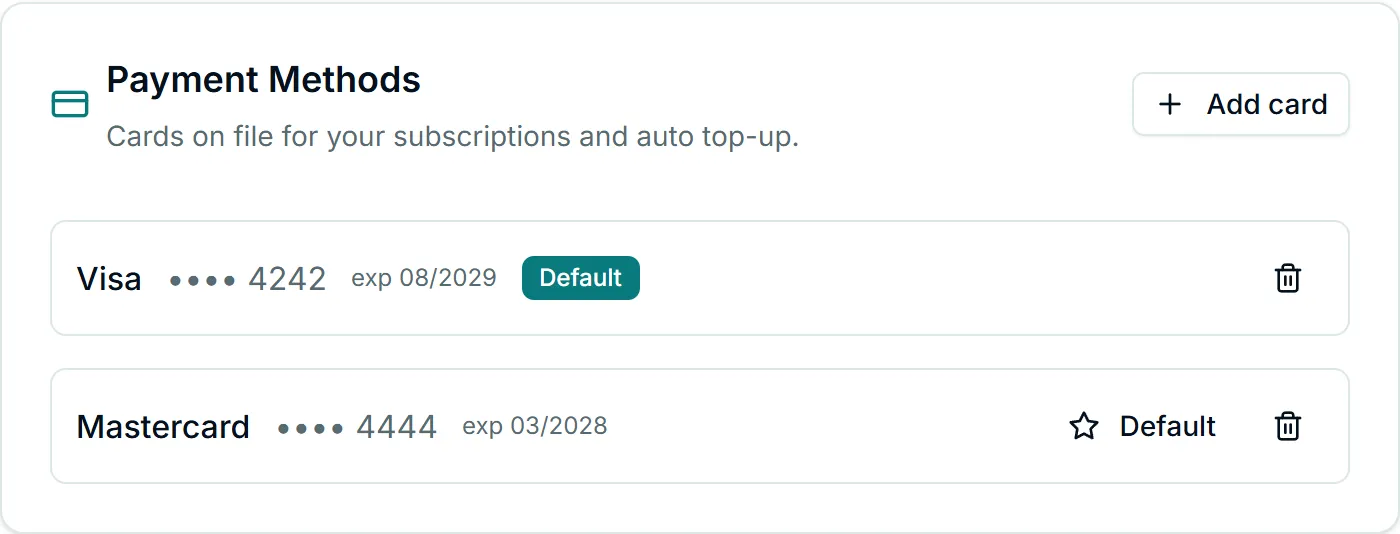
read:subscriptionto read plans and add-ons,read:ordersto poll, andwrite:ordersto buy.write:ordersspends money: give it to one key, held by the one system meant to make purchases, and set an expiry on it. Getting started with the Node4 API shows how to create a scoped key. - For card payments, a saved card. Add one in the dashboard under Account Settings → Profile & Billing, in the Payment Methods card, and mark the one to charge as the default. The API charges the default saved card and cannot add a new one.
- For Bitcoin, a way to pay the invoice. The API returns a payment page; your wallet pays it.
Examples below assume NODE4_API_KEY is set in the environment.
1. Find the plan
GET /plans returns the plans currently on sale, the same set the pricing page shows:
curl -s -H "Authorization: Bearer $NODE4_API_KEY" https://node4.io/api/v1/plans{
"success": true,
"data": {
"plans": [
{
"id": 12,
"slug": "dc-10",
"name": "Premium Datacenter 10",
"productFamily": "premium_datacenter",
"priceCents": "…",
"currency": "usd",
"billingCycle": "monthly",
"proxyCount": 10,
"bandwidthLimitMb": 0,
"countrySelectable": true,
"countries": [{ "code": "US", "label": "United States" }]
}
]
}
}(Values are illustrative and the price is elided here; priceCents is a whole number of US cents in the live response.) Select a plan by slug or productFamily in code and read its id from the response each time, rather than hardcoding an id you saw once. Plans that are not publicly listed are never returned and cannot be bought through the API, even by an account they were made for; those are bought from the dashboard link support sends.
Where countrySelectable is true (dedicated datacenter), you may pass country with one of the listed codes when you order. Leave it out for any country.
2. Place the order
Generate one Idempotency-Key per purchase, keep it, and send it with the order:
KEY=$(uuidgen)
curl -s -X POST https://node4.io/api/v1/orders \
  -H "Authorization: Bearer $NODE4_API_KEY" \
  -H "Content-Type: application/json" \
  -H "Idempotency-Key: $KEY" \
  -d '{"planId": 12, "paymentMethod": "card", "country": "US"}'
import { randomUUID } from "node:crypto";
const idempotencyKey = randomUUID(); // store this with your own order record
const res = await fetch("https://node4.io/api/v1/orders", {
method: "POST",
headers: {
Authorization: `Bearer ${process.env.NODE4_API_KEY}`,
"Content-Type": "application/json",
"Idempotency-Key": idempotencyKey,
},
body: JSON.stringify({ planId: 12, paymentMethod: "card" }),
});
const body = await res.json();
console.log(res.status, body.code ?? "", body.data ?? body.error);import os
import uuid
import requests
idempotency_key = str(uuid.uuid4()) # store this with your own order record
res = requests.post(
"https://node4.io/api/v1/orders",
headers={
"Authorization": f"Bearer {os.environ['NODE4_API_KEY']}",
"Idempotency-Key": idempotency_key,
},
json={"planId": 12, "paymentMethod": "bitcoin"},
timeout=60,
)
print(res.status_code, res.json())The body accepts planId, paymentMethod (card or bitcoin), and optionally discountCode and country. Any other field is refused with 400 invalid_request.
Card or Bitcoin: what each one does
card | bitcoin | |
|---|---|---|
| What is charged | Your default saved card | A Bitcoin invoice you pay |
| Price | Full price, less any valid discount code | Full price, less any discount code, then less account credit |
| Account credit | Never spent | Applied automatically; if it covers the whole order, no invoice is created |
| Fraud and risk checks | The same checks as the dashboard checkout | The same checks as the dashboard checkout |
| Typical response | 201, order already delivered | 201 with a checkoutUrl, order awaiting_payment |
| Available for top-ups and IP slots | No | Yes |
A successful card purchase:
{
  "success": true,
  "data": {
    "paymentMethod": "card",
    "order": {
      "id": 9301,
      "type": "subscription",
      "status": "completed",
      "paymentMethod": "card",
      "planId": 12,
      "subscriptionId": 4410,
      "creditAppliedCents": 0,
      "provisioning": { "status": "delivered", "message": null },
      "delivered": { "subscriptionId": 4410, "activeProxies": 10 }
    }
  }
}
A Bitcoin purchase returns the invoice to pay:
{
  "success": true,
  "data": {
    "paymentMethod": "bitcoin",
    "checkoutUrl": "https://btcpay.node4.io/i/AbC123xYz",
    "paidWithStoreCredit": false,
    "order": { "id": 9302, "status": "pending", "provisioning": { "status": "awaiting_payment", "message": null } }
  }
}
When account credit covers the full amount, paidWithStoreCredit is true, checkoutUrl is null, and the order completes without a payment step. Card renewals and card purchases never draw on credit, so credit is only useful to an integration that pays by Bitcoin.
Card refusals arrive as 402, and in each of them nothing was captured: no_saved_card, card_expired, card_declined (the bank or a risk rule said no; the error text is safe to show), and payment_held (the payment is authorized and under review; do not try again, the order resolves on its own and you are emailed).
3. Buy a bandwidth top-up or IP slots
GET /addons tells you what this account can add right now:
curl -s -H "Authorization: Bearer $NODE4_API_KEY" https://node4.io/api/v1/addonsThe response has two parts. bandwidth says whether top-ups are eligible (only metered plans can buy them; reason explains a refusal), lists ready-made packs such as topup_50gb, and gives bounds (minGb, maxGb) for a custom size written topup_<gb>gb. ipSlots lists ip_1, ip_5 and ip_10 where they still fit under the account's maximum, and needs an active paid plan.
Then buy with POST /topups, again with a fresh Idempotency-Key:
res = requests.post(
    "https://node4.io/api/v1/topups",
    headers={
        "Authorization": f"Bearer {os.environ['NODE4_API_KEY']}",
        "Idempotency-Key": str(uuid.uuid4()),
    },
    json={"addonId": "topup_75gb", "paymentMethod": "bitcoin"},
    timeout=60,
)
print(res.status_code, res.json())
Top-ups are Bitcoin only. "paymentMethod": "card" returns 422 payment_method_unsupported and charges nothing; card top-ups happen only through auto top-up, which you configure in the dashboard (see bandwidth top-ups). Discount codes apply to bandwidth packs but not to IP slots. An add-on outside the bounds or not offered on your plan is 422 addon_unavailable, and a plan that cannot take top-ups at all is 422 topup_not_eligible.
4. Poll the order until it is delivered
GET /orders/{id} (scope read:orders) reports payment and delivery in provisioning.status:
provisioning.status | Meaning | What to do |
|---|---|---|
awaiting_payment | Bitcoin invoice not paid yet | Pay the checkoutUrl, keep polling |
payment_unconfirmed | A card payment's outcome is still being confirmed | Do not pay again; wait for the update and our email |
under_review | A card payment is held for review, authorized but not captured | Do not pay again; wait for the decision |
in_progress | Paid; setup needs a manual step on our side | Nothing; it will finish, and you do not pay again |
delivered | Paid and provisioned | Read delivered for the subscription, proxy count, GB or slots |
not_delivered | The payment did not complete; nothing was delivered | Start a new purchase with a new key if you still want it |
revoked | The order was refunded | Nothing |
async function waitForDelivery(orderId) {
  for (;;) {
    const res = await fetch(`https://node4.io/api/v1/orders/${orderId}`, {
      headers: { Authorization: `Bearer ${process.env.NODE4_API_KEY}` },
    });
    const { data } = await res.json();
    const state = data.order.provisioning.status;
    if (["delivered", "not_delivered", "revoked"].includes(state)) return data.order;
    await new Promise((r) => setTimeout(r, 30_000)); // stay well inside the rate limit
  }
}
Polling every 30 seconds uses a small fraction of the 60 requests per minute each key gets. A webhook avoids polling altogether: order.completed fires when a paid order settles, as described in the webhooks section of the reference. An order belonging to another account answers 404, the same as an order that does not exist.
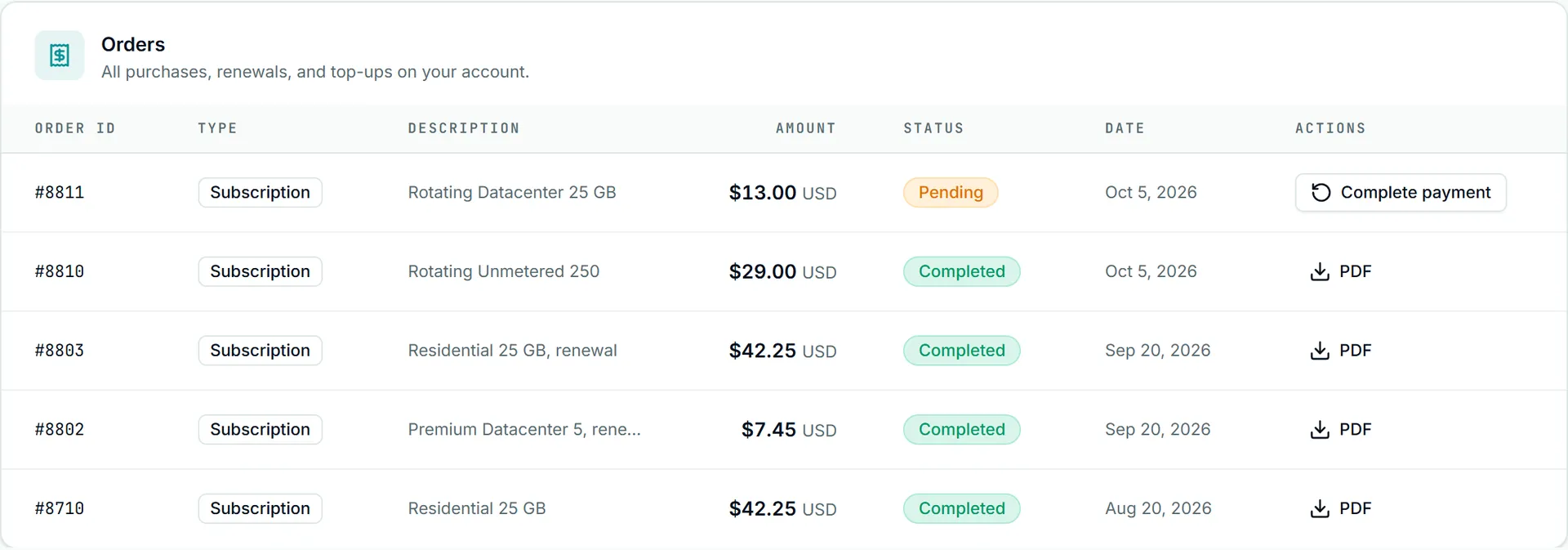
The dashboard's Orders page lists the same orders. A Bitcoin order waiting on its invoice reads Pending; pay from the invoice page you opened. A day later the row offers Complete payment, which starts a new checkout. A delivered order reads Completed with its PDF invoice.
Once delivered, GET /proxies returns the new static proxies; getting started shows the call.
Retrying a purchase safely
Purchases are the one place where a blind retry can cost money, which is why POST /orders and POST /topups refuse to run without an Idempotency-Key. The rules:
- Same key, same body, within 24 hours of the first request: you get the original answer again, with the header
Idempotent-Replayed: true, and nothing is charged twice. This is the right move after a timeout or a dropped connection. - Same key, different body:
422 idempotency_key_reused, nothing runs. A key belongs to one purchase. - First request still running:
409 idempotency_in_flight. Wait a few seconds and resend with the same key. - A refusal that charged nothing (
card_declined,no_saved_card,plan_unavailableand similar) is remembered under that key, so resending it replays the refusal. Fix the cause, then buy with a new key.
Three answers mean stop and check GET /orders, never retry with a new key, because the earlier purchase may have gone through:
outcome_unknown: the first request with this key started a purchase and its result was never recorded.payment_unconfirmed: an earlier card payment on the account is still being confirmed or reviewed. The response carries itsorderIdwhen it can be found.duplicate_recent_purchase: this repeats a purchase that already exists (the same plan by card in the last 2 minutes, or the same items while that Bitcoin invoice is still open). The existingorderId, and for Bitcoin itscheckoutUrl, are in the response.
The complete table of codes and the reasoning behind each is in API errors, rate limits and retries and the idempotency section of the reference.
What the API does not buy or change
- It buys new plans and add-ons. It does not upgrade, downgrade, renew early or cancel an existing plan; buying a second plan of the same type adds to the first rather than replacing it. Plan changes are covered in changing or upgrading your plan.
- It cannot add or change a payment method.
- Unlisted plans, free plans and withdrawn products are never for sale here.
- Invoices for API purchases appear on the Orders page like any other; understanding your invoice explains them.